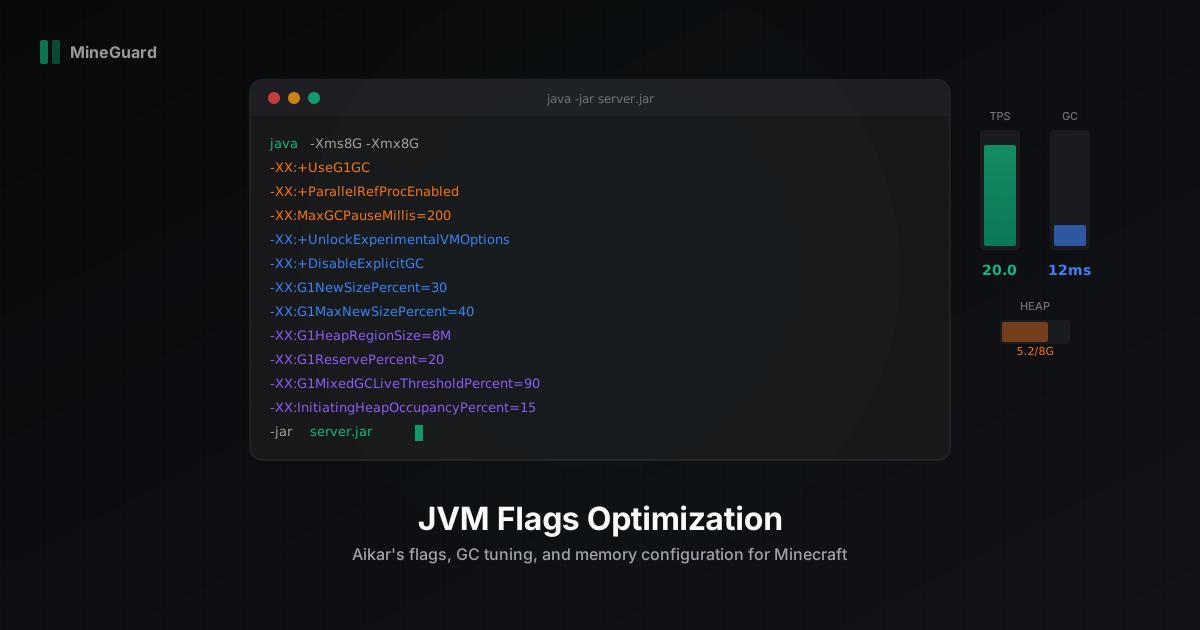
Java JVM Flags Optimization for Minecraft Servers: The Complete Guide
Every Minecraft server runs on the Java Virtual Machine, and the default JVM settings are not designed for game servers. They are built for generic applications that prioritize throughput over latency. For a Minecraft server, latency is everything. A garbage collection pause of 200ms means a visible lag spike that players feel immediately. At MineGuard, we have tuned JVM configurations for hundreds of servers, and in this guide we share everything we know.
What JVM Flags Actually Do
When you launch your server with java -jar server.jar, the JVM uses default settings for memory management, garbage collection, and runtime optimizations. These defaults assume a general-purpose workload. Minecraft is not general-purpose. It allocates and discards millions of small objects every second (block updates, entity ticks, packet buffers), and it needs consistent frame timing with no pauses longer than 50ms.
JVM flags let you override these defaults. They control how much memory the JVM uses, which garbage collector runs, how aggressively it collects, and dozens of other parameters. The right combination can cut GC pause times by 80% and stabilize your TPS at a rock-solid 20.
Memory Basics: -Xmx and -Xms
The two most important flags are -Xmx (maximum heap size) and -Xms (initial heap size). Always set them to the same value:
-Xms8G -Xmx8G
Why equal? When -Xms is lower than -Xmx, the JVM starts with less memory and grows the heap dynamically. Every time it grows, the JVM must pause to reallocate. By setting them equal, you eliminate these resize pauses entirely. The JVM allocates all memory at startup and never has to resize.
How Much RAM Do You Need?
Here is a practical guideline based on player count and world complexity:
- 1-20 players: 2-4 GB
- 20-50 players: 4-6 GB
- 50-100 players: 6-8 GB
- 100-200 players: 8-12 GB
- 200+ players: 12-16 GB
These numbers assume Paper or Purpur with a moderate plugin count (15-30 plugins). Heavily modded servers (Forge/Fabric with 100+ mods) may need 2-4 GB more.
Common mistake: allocating too much RAM. If you have 32 GB available, do not set -Xmx32G. The garbage collector has to scan the entire heap during collection. A larger heap means longer GC pauses. Give your server what it needs plus 20-30% headroom, no more.
Garbage Collection: The Heart of JVM Tuning
Garbage collection (GC) is the process of finding and freeing memory that your server no longer uses. The JVM does this automatically, but the way it does it matters enormously. During a GC pause, your server literally stops processing ticks.
G1GC (Garbage First Garbage Collector)
G1GC is the recommended garbage collector for Minecraft servers and the foundation of Aikar's flags. It divides the heap into regions and collects the ones with the most garbage first (hence the name). This approach gives predictable pause times.
Why G1GC works well for Minecraft:
- Targets a maximum pause time (you set this with
MaxGCPauseMillis) - Handles heaps from 2 GB to 16 GB efficiently
- Performs most work concurrently without stopping your server
- Excellent for workloads with lots of short-lived objects (which Minecraft creates constantly)
ZGC (Z Garbage Collector)
ZGC is a low-latency collector designed for sub-millisecond pauses. Sounds perfect, right? Not quite. ZGC trades pause time for throughput. It uses more CPU to achieve those tiny pauses, and on servers with limited CPU cores, this overhead can actually hurt TPS.
ZGC is worth testing if:
- You have 8+ CPU cores dedicated to the server
- Your heap is 16 GB or larger
- You are running Java 21+ (ZGC improved significantly in recent versions)
For most servers, G1GC with Aikar's tuning will outperform ZGC.
Shenandoah
Shenandoah is another low-pause collector, similar in goals to ZGC but with a different approach. It is available in OpenJDK builds (not Oracle JDK). Like ZGC, it trades CPU for pause time and works best on servers with plenty of cores.
Our recommendation: start with G1GC. Only switch to ZGC or Shenandoah if you have profiled your server with Spark and confirmed that GC pauses are your bottleneck, and you have the CPU headroom to spare.
Aikar's Flags: The Gold Standard
Aikar's flags are a set of JVM flags specifically tuned for Minecraft servers. They have been tested on servers with thousands of players and refined over years. Here is what each flag does:
Core Flags Explained
-XX:+UseG1GC
Enables the G1 garbage collector instead of the default.
-XX:+ParallelRefProcEnabled
Processes reference objects (WeakReferences, SoftReferences) in parallel instead of serially. Minecraft plugins create many of these.
-XX:MaxGCPauseMillis=200
Tells G1GC to target a maximum pause of 200ms. The collector will adjust its behavior to try to stay under this target.
-XX:+UnlockExperimentalVMOptions
Enables experimental flags that are not available by default. Required for some of the tuning parameters below.
-XX:+DisableExplicitGC
Prevents plugins from calling System.gc() manually. Some poorly written plugins do this, causing unnecessary full GC pauses.
-XX:G1NewSizePercent=30
-XX:G1MaxNewSizePercent=40
Allocates 30-40% of the heap to the young generation (where new objects are created). Minecraft creates tons of short-lived objects, so a larger young generation means less frequent young GC.
-XX:G1HeapRegionSize=8M
Sets the size of each G1 region to 8 MB. Larger regions reduce overhead for large heaps but can increase pause times for small heaps. 8M is the sweet spot for 4-16 GB servers.
-XX:G1ReservePercent=20
Reserves 20% of the heap as a safety buffer. This prevents the dreaded "to-space exhausted" full GC pauses that happen when the collector runs out of free regions.
-XX:G1MixedGCLiveThresholdPercent=90
Only collects a region if 90% or more of it is garbage. This reduces the amount of live data that needs to be copied during collection.
-XX:InitiatingHeapOccupancyPercent=15
Starts a concurrent GC cycle when 15% of the heap is used. This is aggressive (default is 45%), but it means the collector starts working early and has more time to finish without causing a pause.
-XX:SurvivorRatio=32
Reduces the survivor space size. In Minecraft workloads, objects either die immediately or live for a long time (like loaded chunks). There is less need for the survivor space to hold objects between collections.
-XX:+PerfDisableSharedMem
Disables writing GC statistics to a shared memory file. This avoids occasional latency spikes caused by filesystem operations.
-XX:MaxTenuringThreshold=1
Promotes objects to the old generation after just 1 GC cycle. Combined with the large young generation, this works well for Minecraft's allocation pattern.
GraalVM: The Alternative Runtime
GraalVM is an alternative JDK distribution that includes an advanced JIT compiler. For Minecraft servers, GraalVM can provide 5-15% better performance compared to standard OpenJDK, especially in computation-heavy scenarios like world generation and redstone processing.
Benefits of GraalVM:
- More aggressive JIT optimization
- Better inlining of method calls
- Improved escape analysis (reduces heap allocation)
- Available as a drop-in replacement for OpenJDK
To use GraalVM, download it from the official website and replace your Java installation. All the Aikar flags work with GraalVM. You can also add GraalVM-specific flags:
-XX:+UseJVMCICompiler
-XX:+EagerJVMCI
Note: GraalVM Community Edition is free. Enterprise Edition offers additional optimizations but requires a license.
Large Pages
Large pages (also called huge pages) let the JVM use 2 MB memory pages instead of the default 4 KB pages. This reduces TLB (Translation Lookaside Buffer) misses and improves memory access performance by 5-10%.
To enable large pages:
- Configure your OS (Linux):
echo "vm.nr_hugepages=4096" >> /etc/sysctl.conf && sysctl -p - Add the JVM flag:
-XX:+UseLargePages
The number of huge pages needed equals your heap size divided by 2 MB. For an 8 GB heap: 8192 / 2 = 4096 pages.
Large pages require root configuration and are most beneficial on dedicated servers. If you are on shared hosting, skip this.
String Deduplication
Java strings that contain the same content can be deduplicated to save memory. This is particularly useful for Minecraft because many identical strings exist in memory (item names, block types, chat messages).
-XX:+UseStringDeduplication
This flag has minimal CPU overhead and can reduce memory usage by 5-10%. It only works with G1GC, which is what Aikar's flags use.
Copy-Paste Flag Sets
Here are ready-to-use flag sets for different server sizes. Copy the entire block and use it as your startup command.
Small Server (2 GB RAM, 1-20 players)
java -Xms2G -Xmx2G -XX:+UseG1GC -XX:+ParallelRefProcEnabled -XX:MaxGCPauseMillis=200 -XX:+UnlockExperimentalVMOptions -XX:+DisableExplicitGC -XX:+AlwaysPreTouch -XX:G1NewSizePercent=30 -XX:G1MaxNewSizePercent=40 -XX:G1HeapRegionSize=4M -XX:G1ReservePercent=20 -XX:G1MixedGCLiveThresholdPercent=90 -XX:InitiatingHeapOccupancyPercent=15 -XX:SurvivorRatio=32 -XX:+PerfDisableSharedMem -XX:MaxTenuringThreshold=1 -XX:+UseStringDeduplication -jar server.jar --nogui
Note: G1HeapRegionSize is set to 4M for the 2 GB server (smaller heap benefits from smaller regions).
Medium Server (4 GB RAM, 20-50 players)
java -Xms4G -Xmx4G -XX:+UseG1GC -XX:+ParallelRefProcEnabled -XX:MaxGCPauseMillis=200 -XX:+UnlockExperimentalVMOptions -XX:+DisableExplicitGC -XX:+AlwaysPreTouch -XX:G1NewSizePercent=30 -XX:G1MaxNewSizePercent=40 -XX:G1HeapRegionSize=8M -XX:G1ReservePercent=20 -XX:G1MixedGCLiveThresholdPercent=90 -XX:InitiatingHeapOccupancyPercent=15 -XX:SurvivorRatio=32 -XX:+PerfDisableSharedMem -XX:MaxTenuringThreshold=1 -XX:+UseStringDeduplication -jar server.jar --nogui
Large Server (8 GB RAM, 50-100 players)
java -Xms8G -Xmx8G -XX:+UseG1GC -XX:+ParallelRefProcEnabled -XX:MaxGCPauseMillis=200 -XX:+UnlockExperimentalVMOptions -XX:+DisableExplicitGC -XX:+AlwaysPreTouch -XX:G1NewSizePercent=40 -XX:G1MaxNewSizePercent=50 -XX:G1HeapRegionSize=16M -XX:G1ReservePercent=20 -XX:G1MixedGCLiveThresholdPercent=90 -XX:InitiatingHeapOccupancyPercent=15 -XX:SurvivorRatio=32 -XX:+PerfDisableSharedMem -XX:MaxTenuringThreshold=1 -XX:+UseStringDeduplication -XX:+UseLargePages -jar server.jar --nogui
Note: increased G1NewSizePercent to 40 and G1MaxNewSizePercent to 50 for larger heap. Added UseLargePages (requires OS configuration).
Enterprise Server (16 GB RAM, 200+ players)
java -Xms16G -Xmx16G -XX:+UseG1GC -XX:+ParallelRefProcEnabled -XX:MaxGCPauseMillis=200 -XX:+UnlockExperimentalVMOptions -XX:+DisableExplicitGC -XX:+AlwaysPreTouch -XX:G1NewSizePercent=40 -XX:G1MaxNewSizePercent=50 -XX:G1HeapRegionSize=16M -XX:G1ReservePercent=20 -XX:G1MixedGCLiveThresholdPercent=90 -XX:InitiatingHeapOccupancyPercent=15 -XX:SurvivorRatio=32 -XX:+PerfDisableSharedMem -XX:MaxTenuringThreshold=1 -XX:+UseStringDeduplication -XX:+UseLargePages -jar server.jar --nogui
For 16 GB servers, you might also consider testing ZGC as an alternative:
java -Xms16G -Xmx16G -XX:+UseZGC -XX:+AlwaysPreTouch -XX:+DisableExplicitGC -XX:+UseLargePages -jar server.jar --nogui
ZGC requires fewer tuning flags because it self-adjusts. Test both configurations and compare using Spark profiler.
Common Mistakes
Mistake 1: Too much RAM. A 32 GB heap on a server with 20 players will give you longer GC pauses, not better performance. The garbage collector must scan the entire heap. Keep it tight.
Mistake 2: Wrong garbage collector. CMS (Concurrent Mark Sweep) was the go-to for years, but it was removed in Java 14. If your startup script still references -XX:+UseConcMarkSweepGC, update it immediately. G1GC is the correct choice.
Mistake 3: Mismatched -Xms and -Xmx. Setting -Xms512M -Xmx8G means the JVM will resize the heap dozens of times as your server loads, causing stuttering and pauses during the first few minutes.
Mistake 4: Using Java 8. Java 8 is ancient. Each new Java version brings GC improvements, security patches, and performance optimizations. Use Java 21 LTS at minimum. Java 21 has significantly improved G1GC and ZGC compared to older versions.
Mistake 5: Ignoring GC logs. Add -Xlog:gc*:file=gc.log:time to your flags. This creates a log file that tells you exactly what the garbage collector is doing. Use tools like GCViewer or GCEasy to analyze it.
Beyond JVM: Network Performance Matters Too
You can tune your JVM to perfection, but if your server is under a DDoS attack or bot flood, none of that matters. Server performance and network performance are two sides of the same coin.
At MineGuard, we handle the network side. Our filter operates at the packet level, verifying connections and blocking malicious traffic before it reaches your server. The overhead? Less than 1ms of added latency. Your players will not notice our protection, but they will notice the absence of lag spikes from bot floods overwhelming your server.
Optimize your JVM flags for the inside performance. Let us handle the outside threats. Together, that is a server that runs at stable 20 TPS no matter what.
Protect Your Server from DDoS Attacks
Free protection with 5-minute setup. 1 TB bandwidth included.
Try for FreeRelated Articles

Minecraft Server in Russia 2026 - Hosting, Protection & Specifics
A comprehensive guide to running and protecting a Minecraft server in Russia in 2026. Covers hosting providers, Russian ISP specifics, DDoS protection options, RUB payments via SBP, and CIS community specifics.
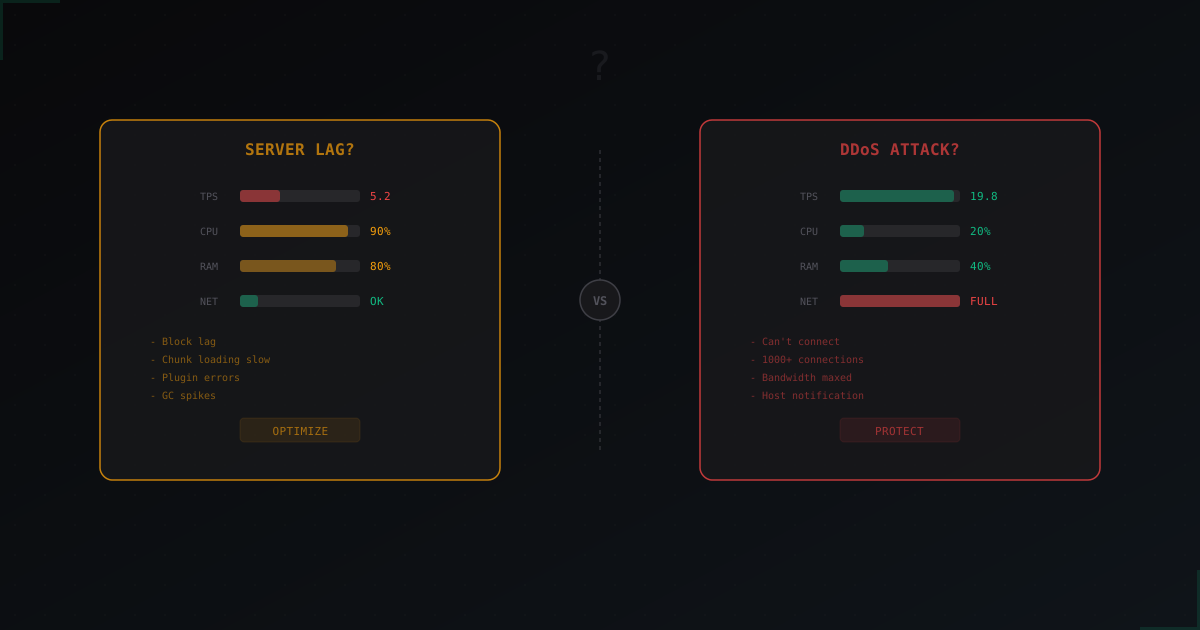
Minecraft Server Lagging: DDoS or Server Problems?
Your Minecraft server started lagging, players are complaining, and you can not tell if it is an attack or something broke on the server.
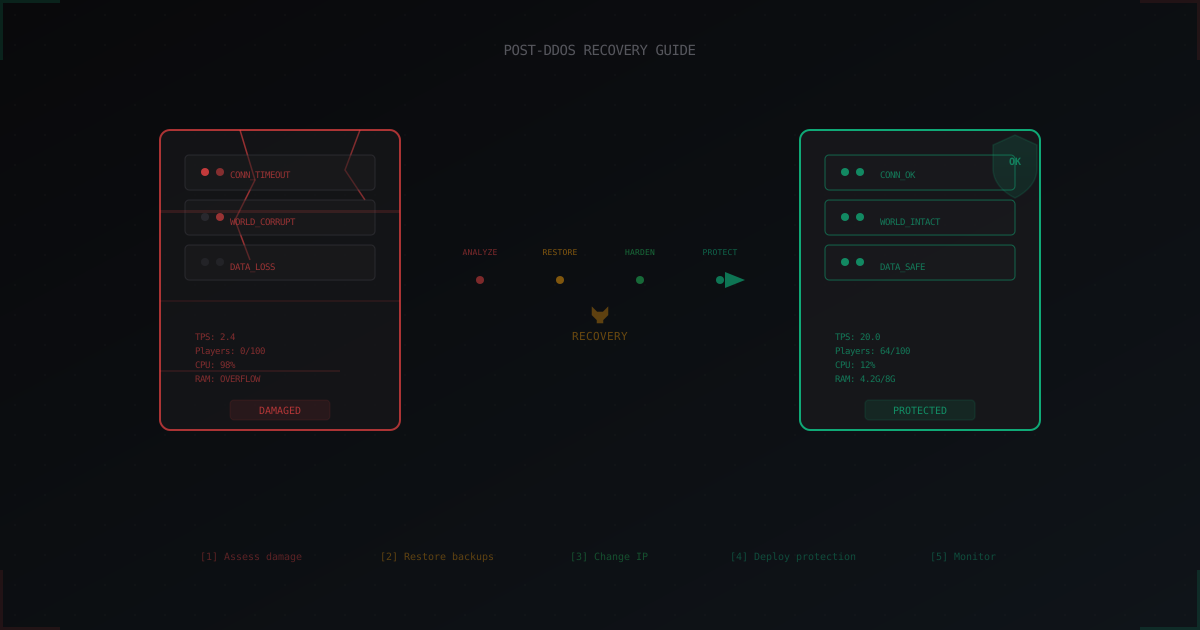
After a DDoS Attack: How to Recover Your Minecraft Server and Prevent Repeats
Step-by-step guide to recovering a Minecraft server after a DDoS attack: data integrity checks, log analysis, IP rotation, protection setup, and a post-mortem template for admins.