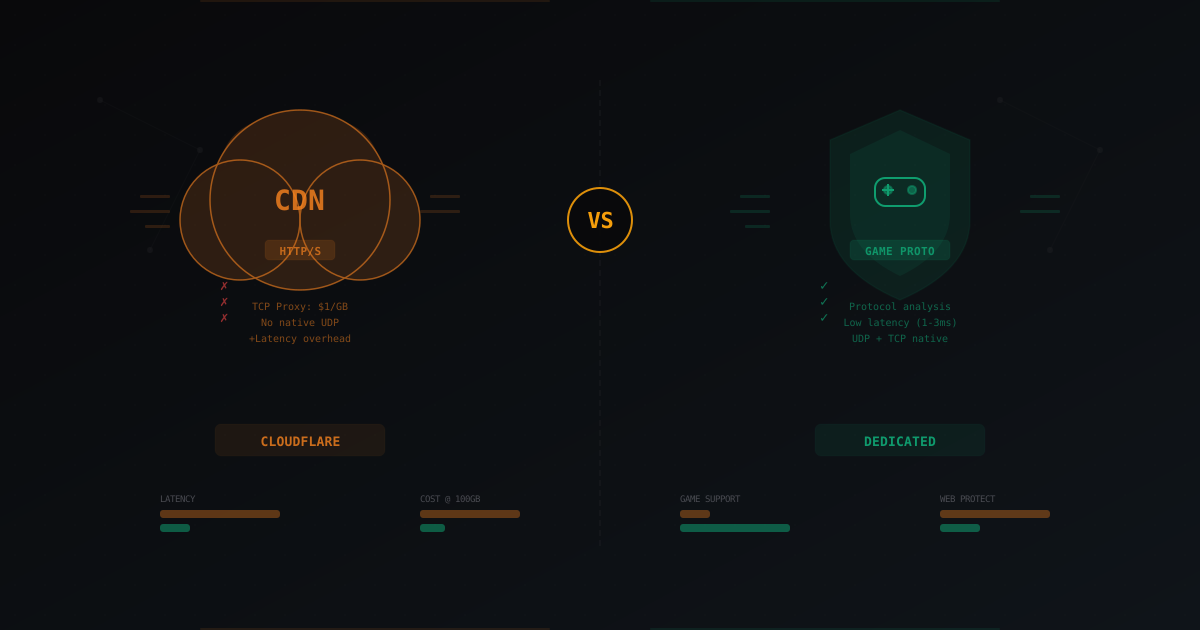
Cloudflare vs Dedicated DDoS Protection for Gaming Servers
When DDoS protection comes up in conversation, Cloudflare is usually the first name people mention. Makes sense - it's a massive company with a global network and a free tier. Why look further?
Here's the thing though: Cloudflare was built to protect websites. Not game servers. Not Minecraft. Not TeamSpeak. Not anything that runs a custom protocol over TCP or UDP. And when you try to force a web tool into a gaming use case, things get weird fast.
This article is a fair comparison of both approaches: Cloudflare (including Spectrum) and dedicated DDoS protection built for gaming. No bias toward either side - just numbers, facts, and real scenarios.
How Cloudflare works and why it's popular
Cloudflare is first and foremost a CDN and reverse proxy for HTTP/HTTPS traffic. The concept is simple: you point your DNS at Cloudflare, all traffic flows through their servers, they cache static content, filter malicious requests, and hide your server's real IP.
For websites, this works brilliantly. Cloudflare has a huge network - over 300 points of presence worldwide. They handle a significant chunk of global HTTP traffic and can filter all sorts of application-layer (L7) attacks: HTTP floods, SQL injection attempts, bots, credential stuffing. When someone tries to take down your website with a flood of requests, Cloudflare handles it like a champ. Years of experience, petabytes of data for machine learning, sophisticated heuristics.
The Cloudflare free tier includes:
- DNS hosting with fast propagation
- CDN for static content
- Basic DDoS protection for HTTP/HTTPS
- Free, automatic SSL certificate
- Real IP hiding for web traffic
- Basic WAF (Web Application Firewall)
- Traffic analytics
Sounds great. But notice the key phrase: HTTP/HTTPS. This is where expectations and reality diverge for game server owners.
Problem number one: Cloudflare doesn't speak game protocols
A Minecraft server runs its own protocol over TCP (Java Edition) or UDP (Bedrock Edition). It's not HTTP. It doesn't even resemble HTTP. Completely different packet structure, different handshake, different operating logic. Cloudflare's free, Pro, and Business tiers only proxy HTTP and HTTPS traffic.
What does this mean in practice? You can't just add your Minecraft server to Cloudflare and get protection. Proxied A records (the orange cloud) only work for web traffic on ports 80 and 443. Your port 25565 won't pass through standard Cloudflare. Period.
Many beginners don't know this. I've seen dozens of forum posts where people add their domain to Cloudflare, enable proxying for all records, and wonder why players can't connect. They spend hours in Discord trying to figure out what's wrong. The answer is simple: Cloudflare blocks all non-standard traffic when proxying is enabled.
They have to disable the proxy (grey cloud) for game records, which means - no protection at all. The server's real IP is visible to anyone who runs nslookup or dig on the domain. And the whole point of Cloudflare vanishes.
Some people try to work around this by running a web proxy that redirects traffic to the Minecraft port. This is a hack that works poorly, adds latency, and breaks under any real load. Don't do this.
Cloudflare Spectrum: TCP proxy for money
Cloudflare has a product called Spectrum that can proxy arbitrary TCP and UDP connections. In theory, this solves the problem: you can route Minecraft traffic through Spectrum and get DDoS protection.
But there are caveats. Significant ones.
Price: $1 per gigabyte
Spectrum charges by traffic volume. At the time of writing, it's roughly $1 per gigabyte of traffic that passes through Spectrum. That's not a typo. One dollar per gigabyte.
Let's do the math. A Minecraft server with 100 players generates roughly 50-100 GB of traffic per month under normal conditions. This varies depending on chunk loading, game mechanics, and plugins. A survival server with minimal redstone - closer to 50 GB. Minigames with constant map switching - closer to 100 GB. That's $50-100/month just for Spectrum. Not counting the actual hosting, plugins, and everything else.
A 300-player server? 150-300 GB, so $150-300/month. For a proxy. Just for a proxy.
Now imagine a DDoS attack. Even a small 1 Gbps attack for one hour is roughly 450 GB of traffic. At Spectrum rates, that's $450 for a single hour of attack. A serious 10 Gbps attack? $4,500 per hour. Sure, Cloudflare filters some attack traffic and not all of it hits billing. But even if 10% of attack traffic makes it to billing - that still hurts.
Picture this: you're a Minecraft server admin, you wake up in the morning, and there's a $2,000 charge on your Cloudflare bill from an overnight attack. Not a great start to the day.
For comparison: dedicated DDoS protection for game servers typically costs a flat monthly fee - $10 to $100 depending on the plan. Doesn't matter how much traffic passes through, doesn't matter if there was an attack. The price is predictable. No surprises at the end of the month.
Latency: 5-30 ms on top
Spectrum adds an extra hop to the traffic path. Your traffic goes: player → nearest Cloudflare PoP → your server. In practice, this adds 5-30 ms of latency depending on player and server location.
For a website, an extra 20 ms is nothing. Users won't even notice. A page loads 0.02 seconds later. For a Minecraft server - it's noticeable. Especially in PvP, where every tick counts. The difference between 30 and 50 ms ping is the difference between landing and missing a sword hit. On servers with active PvP, players feel this and they complain.
The problem gets worse when the Cloudflare PoP is far from your server. Say your server is in Germany and the nearest Cloudflare PoP for a particular player is in France. Traffic goes: Russia → France (Cloudflare) → Germany (server), instead of direct Russia → Germany. That can add 30-40 ms depending on routing.
Dedicated gaming protection solutions typically add 1-3 ms because they're optimized for minimal latency. Their infrastructure is built for real-time traffic, not content caching. Filtering nodes are positioned as close as possible to popular game hosting providers.
No game protocol analysis
This is the biggest difference, and it's often underestimated. Cloudflare Spectrum is a generic TCP/UDP proxy. It doesn't understand that Minecraft traffic is flowing through it. It doesn't parse packets, doesn't verify handshakes, doesn't validate the protocol. To Spectrum, your Minecraft traffic looks identical to database traffic or mail server traffic - just a stream of bytes.
This means Spectrum can filter volumetric attacks (when someone just floods the pipe with junk traffic), but struggles with application-level attacks specific to Minecraft.
Concrete examples:
Bot attacks. An attacker launches hundreds of bots that connect to your server like real players. They complete the handshake, send valid packets, might even log in. Spectrum lets them all through because from a TCP perspective, these are legitimate connections. Your server has to deal with them itself, burning CPU and RAM.
Null ping flood. A Minecraft-specific attack that sends thousands of status request packets. Spectrum sees legitimate TCP traffic and passes it through. Your server chokes trying to respond to every request.
Slowloris-style attacks. Slow connections that open and hold, occupying connection slots. Spectrum doesn't know that 10,000 connections from one IP is abnormal for Minecraft because it doesn't know what normal looks like.
Dedicated gaming protection works differently. It understands the Minecraft protocol, checks each packet against the specification, validates handshakes, tracks behavioral anomalies in "players." A bot that connected but hasn't moved in 30 seconds? Suspicious. 500 connections from one IP in a minute? Blocked. A packet that doesn't match the Minecraft protocol? Dropped before it ever reaches your server. For more details on how this works, there's a separate article explaining DDoS protection mechanics.
Cloudflare free tier: what you actually get
Let's be straight and specific. The free Cloudflare tier gives game server owners exactly two useful things:
-
DNS hosting. Fast, reliable, with a nice dashboard and API. This is genuinely good. Cloudflare DNS is one of the fastest in the world, records update in seconds, the panel is convenient. For managing your domain's DNS records - it's an ideal choice.
-
Protection for your website. If your server has a site (dynamic map, forum, donation store, landing page), Cloudflare will protect it from DDoS and speed up loading. Static caching, WAF, bot protection - for the web part, it works beautifully.
What the free tier does NOT give you:
- Protection for the actual game server (Minecraft, TeamSpeak, etc.)
- IP hiding from targeted reconnaissance (there are dozens of ways to find the real IP)
- Filtering of attacks on game ports
- Game traffic analysis
- Protocol-level bot filtering
You'll sometimes see forum advice like "just put Cloudflare on it and you're protected." That's a half-truth. Your website - yes. Your game server - no. And 99% of the time, attacks target the server, not the site. Because the attacker's goal is to prevent players from playing.
The hidden trap: IP leaks
Even with Cloudflare for DNS, your real IP can leak through multiple channels:
- DNS history. Services like SecurityTrails store DNS record history. If your domain ever pointed to the real IP without Cloudflare, that information is preserved forever.
- Port scanning. If the attacker knows your hosting provider, they can scan the IP range for port 25565 and find your server.
- Email headers. If your server sends email (registration, notifications), the real IP might be in the headers.
- Direct connections. If you have services running outside Cloudflare (FTP, SSH, game port with grey cloud), the real IP is visible.
- Subdomains. Not all subdomains may be behind Cloudflare. One unprotected subdomain reveals the IP of the entire server.
This isn't a Cloudflare problem per se - it's a problem with the "hide the IP and call it a day" approach. It's not enough.
When Cloudflare is the right choice
Despite everything above, Cloudflare is an excellent tool in certain scenarios. It would be dishonest to say it's useless. It's incredibly useful - just not for protecting game servers.
Protecting the web part of your project. If your server has a site with a donation store, forum, wiki, dynamic map - Cloudflare on the free tier will protect all of that beautifully. Enable proxying for web subdomains, configure WAF rules, use Page Rules for caching. Your store won't go down when someone decides to DDoS it.
DNS hosting. Even if you don't use proxying, Cloudflare DNS is one of the fastest and most reliable options out there. Free, with a nice API, with fast record propagation. I recommend it to everyone regardless of what protection they use for their game server.
Small web projects without a game component. For a blog, landing page, API server, personal site - Cloudflare is ideal. Free SSL, CDN, DDoS protection - all out of the box for $0.
Large companies with Enterprise budget. If you're a major game hosting provider and can afford the Cloudflare Enterprise tier with custom Spectrum configuration, direct engineering contacts, and custom pricing - that's a different conversation. But for most Minecraft server owners, this is irrelevant. Enterprise costs thousands per month.
When dedicated protection wins
For game servers, dedicated DDoS protection wins in almost every scenario. Here's why.
Fixed pricing. You pay $10-50/month and don't worry about how much traffic flows through the filter. A 10 Gbps attack won't add a single cent to your bill. That predictability is critical for budget planning. You know in advance exactly what you'll spend this month.
Minimal latency. 1-3 ms instead of 5-30 ms. Players notice the difference, especially in PvP. In practice, good dedicated protection barely affects ping at all. Players won't even realize there's a filter between them and the server.
Deep protocol analysis. The protection understands the Minecraft protocol and filters bot attacks that a generic proxy like Spectrum would let through. Services like MineGuard are built specifically for this - they analyze each connection at the protocol level, check behavior patterns, and filter bots before they ever reach your server. Every packet goes through a chain of checks: protocol compliance, request frequency, behavioral analysis, IP reputation.
Native TCP and UDP support. Full support for both protocols, which matters for Bedrock Edition (UDP) and voice chat servers. No restrictions, no extra configuration needed.
Simple setup. Usually just point your DNS and configure a port. Setup takes 5-10 minutes. No Enterprise tiers, no sales calls, no minimum contracts.
Real attack monitoring. Good dedicated protection provides a dashboard with traffic graphs, filtered packet counts, attack types. You see what's happening in real time. Cloudflare Spectrum gives minimal analytics for non-HTTP traffic.
Cost comparison at different traffic levels
Let's crunch specific numbers. Three scenarios, broken down in detail.
Small server (20-50 players)
Typical server for friends or a small community. Survival or minigames, 10-30 people online at once.
- Monthly traffic: ~30 GB
- Cloudflare Spectrum: ~$30/month
- Dedicated protection: $5-15/month
- During a 1 Gbps attack (1 hour): Spectrum +$200-450, dedicated +$0
Dedicated protection is 2-6x cheaper in normal operation. During an attack, the difference becomes critical.
Medium server (100-200 players)
Server with consistent player base, donation store, active community. The first target level for attackers.
- Monthly traffic: ~100 GB
- Cloudflare Spectrum: ~$100/month
- Dedicated protection: $15-30/month
- During a 5 Gbps attack (2 hours): Spectrum +$1,000-4,000, dedicated +$0
Dedicated protection is 3-7x cheaper. And a 100-200 player server is already a real target for attacks, so incident probability is high.
Large server (500+ players)
Project with thousands of registered players, serious infrastructure, admin team.
- Monthly traffic: ~500 GB
- Cloudflare Spectrum: ~$500/month
- Dedicated protection: $30-80/month
- During a 10 Gbps attack (3 hours): Spectrum +$5,000-13,000, dedicated +$0
Dedicated protection is 6-16x cheaper. At this scale, Spectrum simply isn't cost-effective.
Cost bottom line
The more traffic you have, the bigger the gap. And remember: during a DDoS attack, traffic volume through Spectrum spikes dramatically. Your bill can multiply several times from a single incident. With dedicated protection, the price never changes. You pay one amount and sleep well.
The combined approach: best of both worlds
The best strategy for a serious gaming project is using both tools, each for its own job. You don't have to choose one or the other.
-
Cloudflare (free tier) to protect your website, store, forum, wiki, dynamic map. Proxying enabled for HTTP/HTTPS subdomains. WAF configured. Page Rules optimized.
-
Dedicated DDoS protection for the actual game server. Minecraft traffic goes through a specialized filter that understands the protocol and filters application-level attacks.
-
DNS on Cloudflare, but with the grey cloud for game records pointing to the protected IP from your dedicated provider. This gives you fast DNS without exposing your server's real IP.
-
Real server IP isn't exposed anywhere. Not in DNS, not in email headers, not in subdomains. Only protected IPs - Cloudflare for web, dedicated provider for gaming.
This approach gives maximum coverage: Cloudflare handles the web side (which it does brilliantly), and the specialized service handles the gaming side (which it does brilliantly). Each tool in its element. Cost: $0 for Cloudflare + $10-50 for dedicated protection = complete coverage at a reasonable price.
Common myths
"Cloudflare will protect my Minecraft server for free"
No. The free tier protects HTTP/HTTPS only. Game traffic doesn't pass through it. This isn't a bug or a limitation you can work around - it's the fundamental architecture of the product. Cloudflare Free is a reverse proxy for web, and only for web.
"Hiding my IP behind Cloudflare is enough"
Partially true for the web side. But if your game port is open directly (and it is, unless you're using Spectrum or dedicated protection), the real IP can be found through port scanning, DNS history, email headers, other subdomains, or a dozen other methods. IP hiding is one layer of defense, not a complete solution.
"Spectrum solves everything"
It solves the proxying problem but creates cost and latency problems. And it doesn't provide protocol-level analysis, making it blind to application-level Minecraft attacks.
"Dedicated protection is expensive and complicated"
Actually, the opposite. Most services cost less than Spectrum at any meaningful traffic volume and take 5-10 minutes to set up. For a more detailed breakdown of free vs paid options, check the free vs paid protection comparison.
"I'm a small server, nobody will attack me"
Unfortunately, anyone can be targeted. A competitor, an angry banned player, a bored kid with access to a $10 stresser. Small servers actually get attacked more often because they're usually less protected.
Comparison table
| Parameter | Cloudflare Free | Cloudflare Spectrum | Dedicated Protection |
|---|---|---|---|
| Price | $0 | ~$1/GB (unpredictable) | $5-80/mo fixed |
| HTTP/HTTPS protection | Yes, excellent | Yes | Usually no |
| TCP games (Minecraft Java) | No | Yes | Yes |
| UDP games (Bedrock) | No | Yes (limited) | Yes |
| Protocol analysis | N/A | No | Yes |
| Added latency | 0 ms (no proxy for games) | 5-30 ms | 1-3 ms |
| Protection during attack | Web only | Volumetric | Volumetric + L7 + protocol |
| Price predictability | Yes (free) | No (depends on traffic/attacks) | Yes (fixed) |
| Bot filtering | N/A | Minimal | Deep |
| Attack monitoring | For web | Basic | Detailed |
Decision flowchart
-
You only have a website, no game server? → Cloudflare free, nothing else needed. Perfect tool for this job.
-
You have a game server and a website? → Cloudflare for the site + dedicated protection for the server. Best combination.
-
You only have a game server, no website? → Dedicated protection. Cloudflare won't help with game traffic.
-
You're not being attacked and have zero budget? → Cloudflare DNS (no proxy) + hope for the best. But know that an attack can come at any time. It's not a question of "if" but "when."
-
You have a large project with budget? → Full stack: Cloudflare for web, dedicated protection for gaming, separate protection for voice chat. Don't skimp on security when you've invested hundreds of hours into your project.
Bottom line
Cloudflare is an outstanding product for website protection. That's a fact, and there's no point denying it. For HTTP/HTTPS traffic, there's arguably no better free solution on the market.
But Cloudflare wasn't designed to protect game servers. Trying to use it for that purpose leads to either zero protection (free tier), unreasonable costs with unpredictable billing (Spectrum), or Enterprise tiers that cost more than your entire gaming project.
Dedicated DDoS protection for gaming is a different category of tool entirely. It's cheaper at any meaningful traffic level, faster in terms of latency, and smarter at filtering attacks specific to game protocols. It's built for one job and it does that job well.
Use each tool for what it was built for. Cloudflare for web. Specialized protection for games. That way both your site and your server stay protected, and your budget won't take an unexpected hit the moment the first attack lands.
Protect Your Server from DDoS Attacks
Free protection with 5-minute setup. 1 TB bandwidth included.
Try for FreeRelated Articles
DiscordSRV for SMP: advanced setup, role sync and event automation
Advanced DiscordSRV: LuckPerms role sync, /link verification, dedicated death and achievement channels, console channel, voice and tuning for 200+ players.
How to Monetize a Minecraft Server: Donations, Ranks, Stores & EULA
Complete guide to earning money from your Minecraft server without breaking the Mojang EULA. Monetization models, donation plugins, pricing strategies, and real revenue numbers.
DDoS Attack Trends for Minecraft Servers in 2026
Breaking down the top DDoS attack trends for Minecraft servers in 2025-2026: growing volumes, new attack vectors, smart botnets, and how to defend against it all.