Bot-Join Attacks on Minecraft 2026: How to Tell a Bot from a Real Player
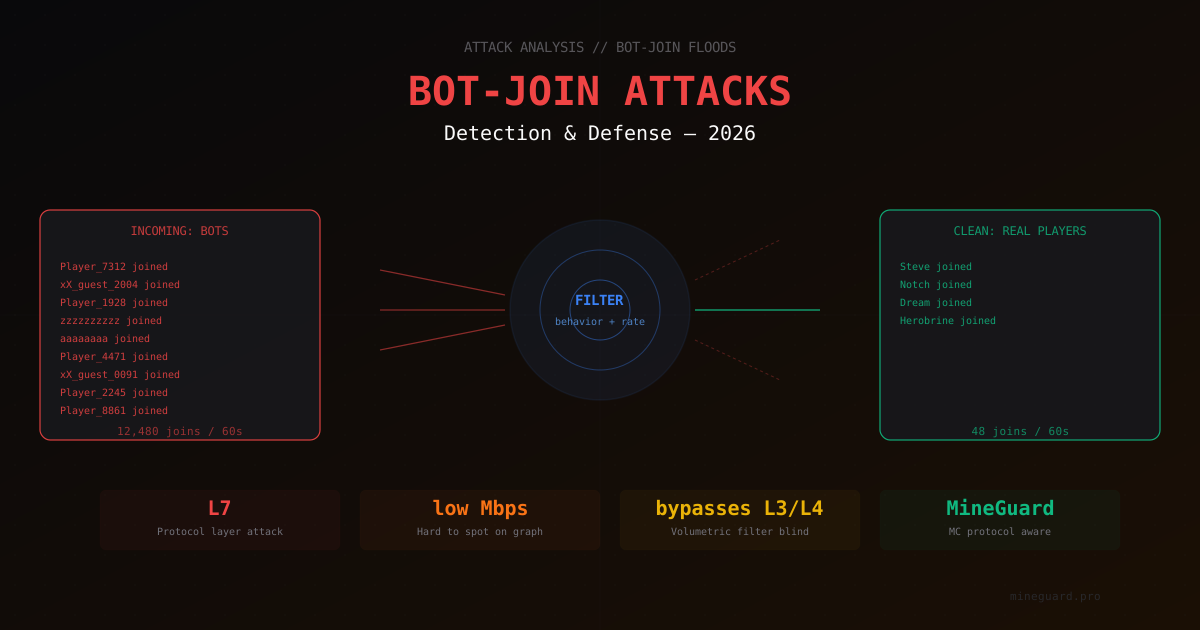
Bot-join attacks in 2026 have become one of the most annoying headaches for Minecraft server administrators. Not because they are powerful in the usual sense. Quite the opposite: such an attack often does not saturate the channel, does not push traffic graphs out of the normal range, and at first glance looks no different from a sudden influx of players. Meanwhile the server is already down.
In this article we will break down what actually happens during a bot-join attack, why regular protection misses it, and what signals modern filters use to separate a bot from a real player. Without attack instructions - only from the defensive side.
What makes bot-join different from classic DDoS
A typical volumetric DDoS is about volume. The attacker fills your channel with junk traffic, so real packets never arrive. L3/L4 filters handle this well by inspecting TCP/UDP headers, dropping obviously malicious packets, and letting the rest through.
Bot-join works differently. It is an L7 attack, meaning it targets the application layer. The bots establish full TCP connections, complete the handshake, send valid Minecraft packets, and reach the login stage. From the network stack's point of view this is indistinguishable from a real player. The channel is not full, graphs look normal. But the server's login queue has thousands of "players" in it, and real users cannot connect.
Main differences from classic attacks:
- Low bitrate. Such an attack can run at only 10-50 Mbps and still take down the server. A volumetric filter will not even see it
- Valid packets. The Minecraft protocol format is respected, no malformed packets
- Full TCP handshake. SYN cookies do not help, connections are established honestly
- Looks like real players. If your server just hit the top of a listing or was mentioned by a YouTube creator, distinguishing a legitimate flood from an attack without specialized tools is nearly impossible
How bot-join looks in logs
The first thing an administrator notices: logs suddenly explode with UUID of player X is ... and X logged in with entity id ..., but online count barely grows and TPS drops. Meanwhile latest.log on Paper fills with connect/disconnect lines at a rate incompatible with reality.
Typical visual markers:
- Cascade of similar nicknames.
Player_1234,Player_5678,Player_9012- sequential numbers, template prefixes, absurd unicode strings. Legitimate players do not do that - Strange nicknames with repeating characters.
aaaaaaaa,zzzzzzzzzz,xX_guest_0001- generated randomly or by simple templates - Everyone has the same client version. Thousands of "players" share identical Protocol Version and Client Brand strings
- Sharp CPS (connections per second) spike. From 1-2 in normal times to 200-500 during an attack
- Instant disconnects after login. A bot gets kicked by anti-cheat or player limit, the next one comes in
If you see this in logs - your server is under bot-join attack. The next question is how to stop it.
Why it works
Why is bot-join effective at all? Several Minecraft-specific factors combine.
Expensive login process. Every connection costs the server serious work. The server generates keepalive, validates UUID, in online-mode hits the Mojang session server, loads player data from disk, loads spawn chunks. That is tens of milliseconds of CPU and several kilobytes of IO per login. At a thousand bots per second this becomes overload.
Main thread bottleneck. A Minecraft server is single-threaded for most of the game logic. While the main thread is busy processing logins, TPS (tick rate) drops and real players lag. A classic DoS scenario: not via the channel, but via CPU.
Online slots. If a bot makes it into the "player queue", it occupies a slot. Even if it drops a second later, a new bot takes its place. Real players cannot squeeze through.
Detection difficulty. Unlike SYN flood, bot-join traffic looks like regular MC traffic. A plain reverse proxy like HAProxy without deep understanding of the Minecraft protocol cannot help.
Who does it and why
Motivations for bot-join attacks in 2026 vary but usually come down to a few scenarios.
Competitors. Most common case. The owner of a rival server wants to crash your online count so players get frustrated and leave. Attacks happen in prime time, last a couple of hours, repeat every few days.
Extortion. Telegram and Discord still circulate messages like "pay or your server goes down". They attack once for demonstration, then offer "protection".
Offended players. Banned a cheater or random guest who, feeling wronged, ordered an attack. Booter-service prices keep dropping, and L7 attacks on Minecraft are accessible even to teenagers with pocket money.
Vandalism. Simply because they can. They see a popular server in rankings and try to take it down for fun.
We will not discuss specific services attackers use - this is explicitly illegal activity, regularly shut down as part of international operations like Operation PowerOFF. What matters for us is that these attacks exist, are cheap, and are common. Everyone has to defend.
What filters use to tell a bot from a player
Modern protection against bot-join does not rely on one thing. A combination of signals works. Let us go through them layer by layer, from shallow to deep.
Frequency analysis
The first and simplest signal is speed. How many unique connections arrive per second from one IP, one subnet, one AS, one geographic region. A real server has stable metrics: there are peaks when a server launches, drops at night, but a 100x spike in a second is an anomaly.
Important note: a filter cannot simply block everything fast. If your YouTube video went viral and 5000 people try to join simultaneously, that is also an anomaly but a legitimate one. So frequency analysis always works in pair with other signals.
Minecraft protocol analysis
A filter that understands Minecraft protocol can validate every packet against the official spec. Bots often simplify things:
- send wrong field sizes
- pass identical protocol version flags that do not match the declared client brand
- skip or duplicate required handshake packets
- respond to keepalive incorrectly or with identical timing
All of this is invisible to a regular L4 filter but visible to a specialized one. MineGuard analyzes L7 behavior inside the protocol itself.
Behavioral signals
The most complex and most accurate class of signals. Here we look at how the client behaves after connecting:
- Timing. A real player presses "Join Server" in the client and waits. Between handshake packets there are micro-delays from UI processing. A bot does everything faster, with perfectly identical intervals
- TCP fingerprint. The client's operating system leaves a recognizable trace: TCP window size, MSS, options. Mass-produced bots often run from one environment with identical stack parameters
- Nickname entropy. Mathematical entropy of bot nick strings differs from real ones. Generators produce either too regular sequences or too random ones
- Reconnect patterns. A real player does not try to reconnect 50 times in a minute after a kick. A bot does
Cookie and proof-of-work verification
One of the most effective methods is requiring the client to do some work before reaching the server. MineGuard issues a one-time token to the connecting client that needs to be presented on the next connection. If the client cannot save and present the token properly - it gets cut off. A real Minecraft client handles this transparently; mass bots either cannot, or spawn a fresh connection every time.
Captcha at the game server level
A separate category is in-game captcha. A player connects to an intermediate limbo world where they need to solve a simple task (type a code in chat, click a specific block, solve a simple visual puzzle). Only then are they admitted to the main server. This cuts off 99% of bot-join traffic because bots rarely have visual AI for captchas. More details in our captcha auto-solve protection guide.
Common mistakes administrators make
Over years of handling attacks we see the same mistakes. Here are the most frequent.
Whitelist only. Enabling a whitelist during an attack. Works only against bots trying to join as guests. But once the attacker has the list of active nicknames (from the server rating page, for example), they will join under those names. Protection breaks.
Relying on online-mode. Enabling premium-only mode, thinking bots cannot pass auth. In reality Microsoft auth for bots is solved by renting premium accounts (a whole market for this service). Online-mode cuts off some simple bots but not a serious attack.
Fail2ban on logs. Setting a rule like "if one IP makes X connections - ban it". Problem: a serious attack comes from thousands of IPs via proxies and botnets. Each IP does one or two connections, fail2ban cannot keep up.
Increasing OS connection limits. Raising net.core.somaxconn, nf_conntrack_max, raising file descriptor limits. This lets you survive the attack longer but does not solve the problem. Sooner or later the main thread or the channel runs out.
Installing an "anti-bot plugin" and feeling protected. Many server-level plugins work on simple signatures. Against advanced 2026 botnets this is not the right level of defense.
What actually works
Based on experience with hundreds of protected servers, here is what really helps.
Multi-layered defense
You cannot rely on a single layer. Only a combination works:
- Network filter (L3/L4) cuts classic volumetric traffic before it reaches the server. MineGuard uses XDP/eBPF filtering in the Linux kernel - see our XDP/eBPF guide
- Protocol filter (L7) parses Minecraft packets and drops invalid ones
- Behavioral analyzer watches connection patterns and detects anomalies
- In-game captcha catches remaining bots at the gameplay level
Each layer cuts part of the attack. Together they give 99%+ filtration at minimal false positive rate.
Proper Paper limits
In paper-global.yml and paper-world.yml you want sensible limits set. In server.properties:
network-compression-threshold=256
rate-limit=0   # if a DDoS filter sits in front, rate-limit is handled there
max-tick-time=60000
enable-query=false
Full breakdown in our paper-spigot security settings article.
A proxy with a sane architecture
If you run a network of servers (hub, lobby, minigames) - use a modern Velocity proxy with proper modern secret forwarding. See our Velocity vs BungeeCord article and proxy network architecture guide.
Monitoring with alerting
Do not wait for players to complain on Discord. Set up monitoring that immediately notifies you about:
- sharp rise in CPS (connections per second)
- TPS dropping below 18
- login queue growth
- abnormal patterns in logs
MineGuard ships with built-in analytics and a real-time dashboard. More details in our monitoring attacks guide.
About false positives
Let us talk briefly about false positives. Any filter sometimes errs and blocks a legitimate player. That is the cost of protection.
MineGuard minimizes this through several mechanisms:
- Whitelist for verified players. After passing captcha, the IP enters a trusted-list and skips re-verification on subsequent connections (within a certain window)
- Adaptive thresholds. If your server normally does 50 CPS in prime time and suddenly sees 70 - that is not an anomaly. If 500 - that is an attack. Thresholds tune automatically
- Allowlist for known hostings. Popular hosting providers and VPN services that real players use are known and not flagged automatically
Zero false positives is unreachable. But the choice is usually: a small percentage of "stuck" players who need to reconnect, or a downed server. The first is always better.
What to do right now if you are under attack
If you are reading this while the server is already under attack - quick plan.
- Enable provider DDoS protection. If there is a control panel - activate all filters. If you are with MineGuard - make sure protection is at maximum
- Temporarily flip to whitelist-only. This keeps regulars online while you figure things out
- Check logs. Find attack patterns (which nicknames, which IPs, which packet patterns)
- Raise OS limits.
ulimit -n 100000,sysctl net.core.somaxconn=65535 - Contact your protection provider's support. The faster the better
A more detailed emergency plan is in our Minecraft under DDoS emergency guide.
Summary
Bot-join is an application-layer attack that classic DDoS filters are useless against. You need a specialized solution that understands Minecraft protocol and can tell a bot from a player by dozens of behavioral signals.
Attack methods evolve, but so does defense. In 2026 a good multi-layered filter (L3/L4 + L7 + behavioral + captcha) stops the vast majority of bot-join traffic at near-zero false positive rate.
The main thing for a server admin is not to rely on a single plugin or single layer. Treat protection not as "set and forget" but as a process. Monitoring + multi-layered filtering + correct server configuration + log literacy. Then bot-join attacks turn from a lethal threat into a manageable nuisance.
MineGuard specializes exactly in L7 filtering of Minecraft traffic. If you need protection against bot-join and other protocol-level attacks - check our plans or contact support. We will review your case and help pick a configuration.
Protect Your Server from DDoS Attacks
Free protection with 5-minute setup. 1 TB bandwidth included.
Try for FreeRelated Articles
New Filtering Location in Russia - Moscow
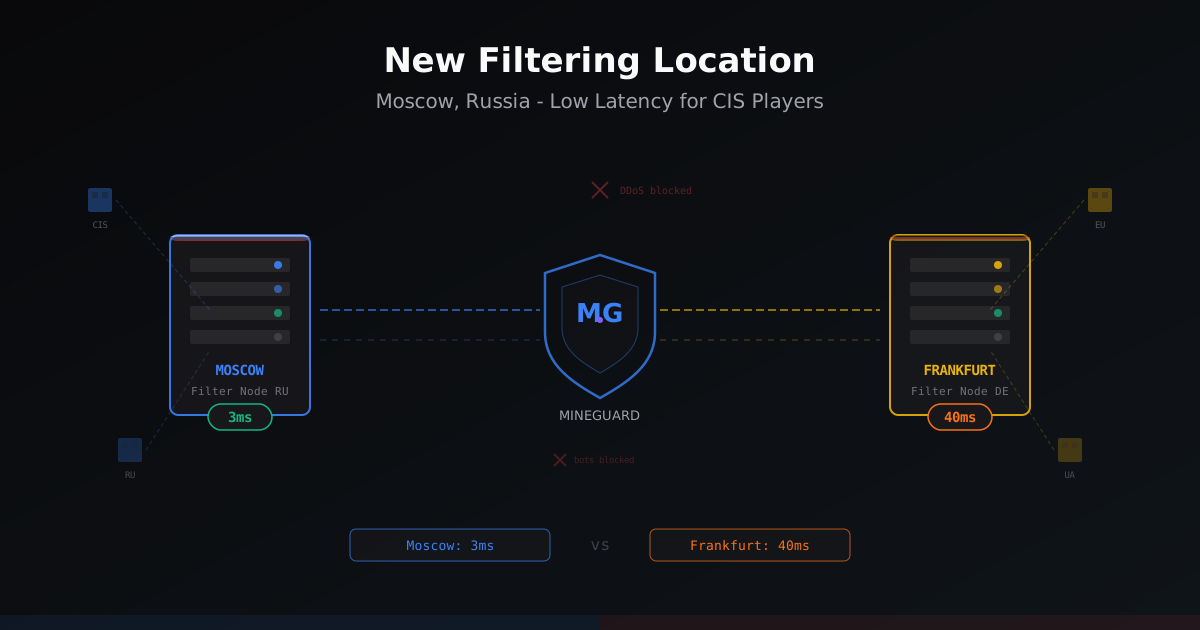
MineGuard launched a filtering node in Moscow, Russia. CIS players get 30-40ms lower ping while European and Ukrainian traffic still routes through Germany. Learn how it works and who should enable it.
DiscordSRV for SMP: advanced setup, role sync and event automation
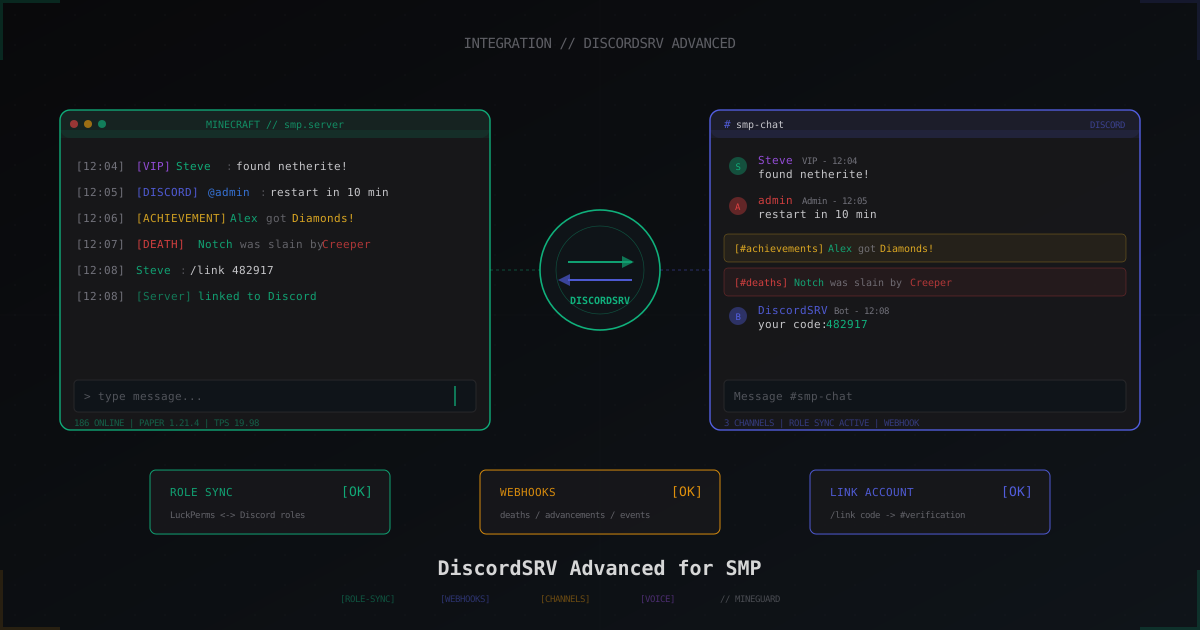
Advanced DiscordSRV: LuckPerms role sync, /link verification, dedicated death and achievement channels, console channel, voice and tuning for 200+ players.
Velocity vs BungeeCord: Why It's Time to Switch
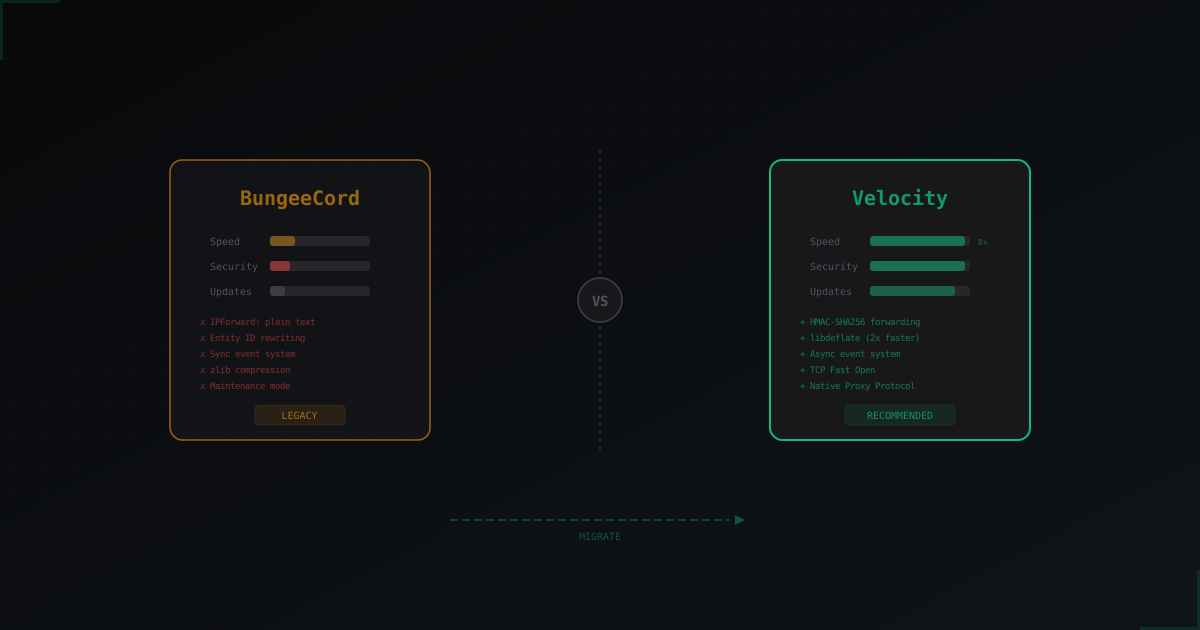
A detailed comparison of the two Minecraft proxies: performance, security, and plugin ecosystem. We break down why Velocity wins on every front and how to migrate from BungeeCord painlessly.