ShopGUIPlus vs QuickShop vs ChestShop: which shop plugin to pick in 2026
A living server economy keeps players around past day three. Without a usable shop, interest fades faster than you can wire up your rank system. The market has three battle-tested options: ShopGUIPlus with a paid GUI menu, QuickShop-Hikari with chest-based player shops, and ChestShop with old-school signs. Here is the practical breakdown of how they differ and where each fits.
Three shop models, one job
Before comparing the plugins, you have to understand the three underlying models, because everything else flows from them.
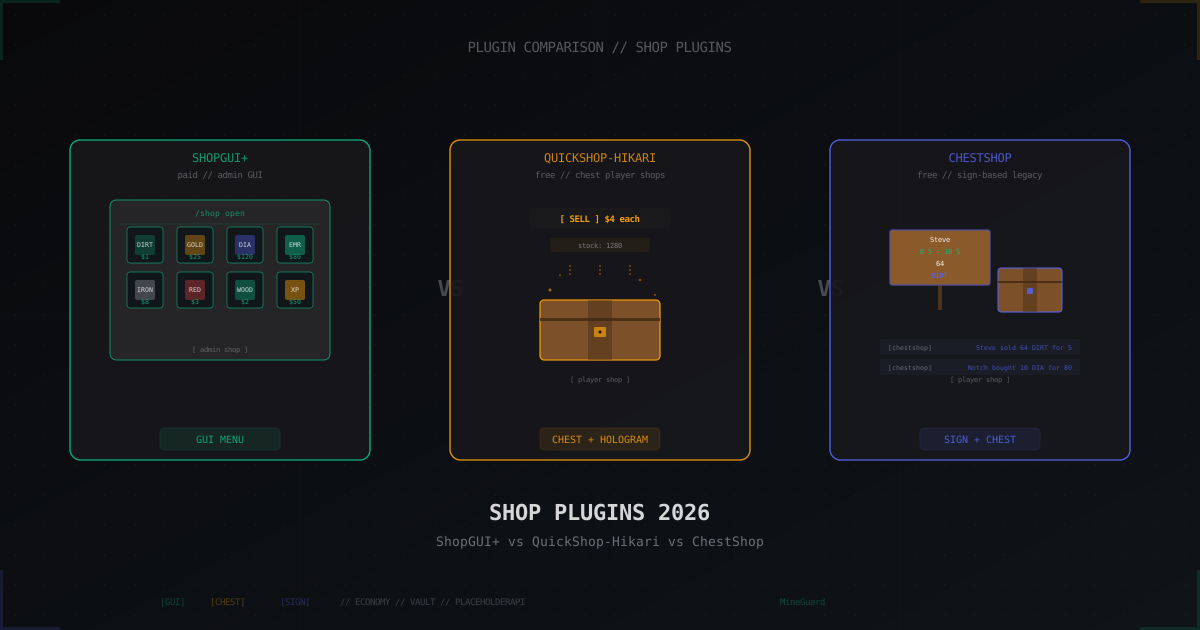
Admin GUI (ShopGUIPlus). The admin defines prices in YAML, the player runs /shop, sees categories and clicks items. Prices can be static or dynamic by formula. The server is both buyer and seller. There are no physical chests, items just appear in the player inventory.
Chest-based player shops (QuickShop-Hikari). A player places a chest, clicks it with an item in hand, and the plugin turns that chest into a personal shop. A hologram with price and stock floats above. Other players click and buy or sell. Money goes to the chest owner.
Sign-based player shops (ChestShop). Same idea as QuickShop, just no GUI windows. The player places a chest, hangs a sign next to it and writes the format Steve / 64 / B 100 : 50 S / DIAMOND. Right-click the sign to buy. Minimum magic, maximum compatibility with any Spigot/Paper version.
These models are not interchangeable. Big servers usually run an admin shop for base resources alongside player shops for rare loot.
ShopGUIPlus: paid premium for GUI and dynamic prices
ShopGUIPlus by brcdev costs around $14.99 on BuiltByBit and has stayed at the top of paid plugins for seven years running. The current 1.95.x branch supports Paper 1.20.x through 1.21.x.
What the price gets you:
- ready-made GUI menu with category icons
- static and dynamic pricing (formula based on demand)
- daily and hourly buy and sell limits
- full integration with Vault, PlaceholderAPI, EconomyShopGUI, MMOItems
- web-based config builder on the project site (drag and drop)
- support for custom items via ItemsAdder, Oraxen, MMOItems
- built-in anti-abuse: dupe-trade blocks, multi-account IP limits
A real config snippet:
# plugins/ShopGUIPlus/shops.yml
farming:
  name: '&aFarming'
  size: 27
  menuItem:
    id: WHEAT
    slot: 11
  items:
    '0':
      type: item
      item:
        material: WHEAT
        quantity: 1
      buyPrice: 5
      sellPrice: 2
      slot: 0
    '1':
      type: item
      item:
        material: CARROT
        quantity: 1
      buyPrice: 4
      sellPrice: 1.5
      slot: 1
Dynamic pricing runs through dynamicPricing.priceChange. The more players sell an item, the lower its price drops. The more they buy, the higher it climbs. Classic supply-and-demand, and on bigger servers it saves the economy from runaway inflation.
Downsides: $14.99 one-time, but the license covers a single Spigot ID. A network of ten boxes needs separate keys or the multi-server license. Documentation is patchy in places, updates land every two or three months.
QuickShop-Hikari: open-source heir of QuickShop
The QuickShop history is messy. The original QuickShop-Reremake shut down in 2022, and QuickShop-Hikari by Ghost-chu picked up the codebase and now drives it forward. The current 6.x branch lives on Hangar PaperMC under GPL-3, fully free.
Key Hikari features:
- chest-based player shops with price and stock holograms
- admin shops as a side feature (
/qs create admin) - built-in anti-abuse: per-player chest limits, access checks
- full transaction logs in SQLite or MySQL: who sold, to whom, what, when, at what price
- integrations with Vault, PlaceholderAPI, WorldGuard, GriefPrevention, Towny, Lands
- multi-currency through Vault hooks or TheNewEconomy
- async DB ops: heavy queries do not block the main thread
The config stays small because most settings live in the in-game GUI. The base config.yml:
# plugins/QuickShop-Hikari/config.yml
shop:
  limits:
    use-old-canbuild-permission-checker: false
    default: 3
    ranks:
      vip: 10
      premium: 25
  protection:
    inventory-move-detection: true
    listen-block-break: true
    listen-block-piston: true
  display-type: VIRTUALITEM
  cost-goto-tax-account: true
  tax: 0.05
logging:
  log-actions: true
  log-balance: true
Out of the box a player drops a chest, right-clicks it with a diamond, sets the price and they are done. A hologram pops up reading [Sell] $80 each, stock: 64. Other players click and pay, money flows to the owner with the 5% tax (tax: 0.05) routed to the tax-account balance.
Under the hood Hikari uses VIRTUALITEM displays: items render through packet-based armor stands instead of real entities, which keeps RAM and CPU lean. On a server with thousands of shop chests the difference against the legacy QuickShop is obvious.
ChestShop: a 2010s legend that still works
ChestShop (formerly iConomyChestShop) shipped in 2011. The active branch is 3.12.x by ChestShop-authors on GitHub, supporting versions up to 1.21.x. Pure open-source under BSD.
Biggest plus: simplicity. No holograms, no GUI, just a chest and a sign on top of it. The player places a chest, hangs a sign, types four lines:
[first line stays empty, the plugin fills the username]
64
B 100 : 50 S
DIAMOND
The plugin parses the format and turns the sign into a shop: 64 diamonds, buy for 100, sell for 50. Buy through right-click on the upper half of the sign, sell through the lower half.
What still matters in 2026:
- minimal dependencies: only Vault and a Bukkit economy plugin
- low load: signs and chests are native blocks, no extra entities
- full compatibility with any region protection (WorldGuard, Lands, Towny)
- simple migration: transactions log to a flat file, easy to grep through
- multi-language signs: the same syntax works in EN, RU, DE, PL with no extra config
The weak spots show up immediately: no stock hologram, no visual feedback (just a chat message), and new players choke on the sign syntax. For thirteen-year veterans this is fine, for fresh audiences it is friction.
Clean and short config:
# plugins/ChestShop/config.yml
SHOP_INTERACTION_DISTANCE: 5
SHOP_REFUND_PRICE: 0
STACK_TO_64: true
ALLOW_PARTIAL_TRANSACTIONS: true
ALLOW_AUTO_ITEM_FILL: true
LOG_TO_DATABASE: true
LOG_TO_CONSOLE: false
DATABASE:
  TYPE: SQLITE
  HOST: localhost
  USERNAME: root
Integrations: Vault, PlaceholderAPI and custom items
All three plugins lean on Vault as the economy abstraction. Behind Vault you can run EssentialsX Eco, CMI Economy, TNE, or GemsEconomy for multi-currency.
PlaceholderAPI:
- ShopGUIPlus: a full set of placeholders like
%shopguiplus_buyprice_<shop>_<item>%and%shopguiplus_sellprice_<shop>_<item>%that drop into any scoreboard - QuickShop-Hikari:
%quickshop-hikari_<owner>_shops%and%quickshop-hikari_<player>_balance%, handy for top lists - ChestShop: integration via third-party bridges only, no native support
Custom items (ItemsAdder, Oraxen, MMOItems):
- ShopGUIPlus supports all three out of the box through ID notation:
material: 'mmoitems:WEAPON:KING_SWORD' - QuickShop-Hikari hooks them via the ItemMatcher API: just put the custom item in your hand when creating the shop
- ChestShop only handles vanilla IDs, custom items need the
ChestShop-ItemBridgeadd-on or manual NBT parsing
In practice if your server already runs ItemsAdder or Oraxen, ShopGUIPlus and QuickShop-Hikari are the easy choices. ChestShop loses on this one.
Performance with 200+ players online
This is the deciding question for any large SMP or RPG server. Every shop open hits the main thread, chunk gen lags, TPS suffers.
ShopGUIPlus. Since shops are just GUI inventories, plugin load is small and scales nicely. The real risk is the Vault economy behind it. If EssentialsX Eco writes YAML on every transaction, with 200 players online you will see a 5-10 ms freeze each time someone buys. Fix: switch to CMI Economy or TNE on MySQL.
QuickShop-Hikari. The biggest cost is hologram rendering and chest click handling. With VIRTUALITEM holograms across 5000 shop chests the plugin sits at around 50-80 MB RAM and 1-2% CPU per core. The painful part is the shop lookup near a player. On big maps with 50k+ shops you have to bump cache-size and switch to MySQL.
ChestShop. The lightest of the three. No holograms, no constant rendering, the plugin only wakes up on a sign right-click. With 10k sign shops, main thread cost is near zero. The downside: no built-in async logging, on a cheap VPS with slow disk the log writes can stutter.
Real benchmark on Paper 1.21.4, 200 online, 8 cores, 32 GB RAM, NVMe:
- ShopGUIPlus + CMI Economy: stable 19.9 TPS, 0.4 ms per buy
- QuickShop-Hikari MySQL: 19.8 TPS, 1.2 ms per transaction
- ChestShop SQLite: 19.95 TPS, 0.2 ms per click
On Folia, QuickShop-Hikari is partially adapted, ShopGUIPlus and ChestShop run via Folia compat patches. Test in staging before pushing to prod.
Moderation and anti-abuse
Any player shop is a vector for scams. A player will list a diamond for 1 coin, dupe through a hopper, sell to themselves through alts. Without logs you cannot unwind it.
ShopGUIPlus sidesteps this because admin runs the shop. The threat is dupes via give commands or vanilla recipe bugs. Defenses: per-player daily sell limit (limits.sell.daily), trade restricted to the spawn region.
QuickShop-Hikari ships built-in protections:
- per-player chest limit (
shop.limits.default: 3) - whitelist of item types via
shop-blacklist - GriefPrevention and Lands integration: shops cannot be placed outside the owner claim
- full DB logs with rollback through
/qs history rollback
ChestShop ships the bare minimum: file logs and LOG_TO_DATABASE: true. Rollback is manual through log parsing and /eco take. Anti-abuse comes from third-party plugins like DupeFixerMax.
Pricing and licensing
- ShopGUIPlus: $14.99 one-time, single Spigot ID license. Network license for BungeeCord around $29.99
- QuickShop-Hikari: free, GPL-3, fork is alive and active
- ChestShop: free, BSD, updates every six to twelve months
For a free ShopGUIPlus alternative, look at EconomyShopGUI (also a GUI menu, free on SpigotMC). I am not running it through the same comparison here, but if your budget is zero and you want an admin menu, EconomyShopGUI handles 80% of the use case.
Migrating data between plugins
This is the painful part. There is no universal export format between plugins.
- ShopGUIPlus → QuickShop-Hikari: rebuild by hand because SGP has no player shops to carry over
- QuickShop-Hikari → ShopGUIPlus: doable for admin shops in SGP, but prices need a rewrite
- ChestShop → QuickShop-Hikari: a community sign-parser script exists, hunt around the QuickShop-Hikari GitHub
- QuickShop-Hikari → ChestShop: a downgrade that loses holograms and rich logs
Realistically most admins run the new plugin in parallel for a week, give players time to move inventory, then close the old one.
Big comparison table
| Criterion | ShopGUIPlus | QuickShop-Hikari | ChestShop |
|---|---|---|---|
| Price | $14.99 | free | free |
| License | proprietary | GPL-3 | BSD |
| 2026 version | 1.95.x | 6.x | 3.12.x |
| Model | admin GUI | player chest | player sign |
| Holograms | none (GUI) | yes, VIRTUALITEM | none |
| Player shops | no | yes | yes |
| Admin shops | yes | yes (secondary) | via extension |
| Dynamic pricing | yes | no | no |
| Vault | yes | yes | yes |
| PlaceholderAPI | full | full | bridge only |
| ItemsAdder/Oraxen | yes | yes | bridge only |
| MMOItems | yes | yes | no |
| Transaction logs | basic | full SQL | flat file |
| Anti-abuse | admin side | built-in | minimal |
| Folia | partial | partial | patches |
| Multi-currency | via Vault | yes | via Vault |
| Web config builder | yes | no | no |
| TPS impact at 200 online | < 1% | 1-2% | < 0.5% |
When to pick which
- ShopGUIPlus is the call when you want a centralized admin shop with polished UI, dynamic pricing and custom items. Fits servers with deep economy: SkyBlock, Prison, RPG, OneBlock.
- QuickShop-Hikari suits a living player-driven economy with a clean UX. Ideal for SMP, Towny, Lands servers where players actually build markets and shop districts.
- ChestShop wins on stability, near-zero magic, and very legacy vanilla mechanics. Picks itself for classic Survival and Anarchy projects where players already know the sign syntax cold.
There is also the combined setup, common on big projects: ShopGUIPlus as the admin shop for base resources (dirt, wood, food) plus QuickShop-Hikari for player shops in a trading district. Players get both a steady sink for excess loot and free trade with each other.
FAQ
Can I run ShopGUIPlus and QuickShop-Hikari side by side?
Yes, no conflicts. They live in different layers: SGP runs through /shop GUI, QuickShop runs through chests in the world. Vault balances the same player account. Many large networks run both.
Which plugin is best for SkyBlock?
ShopGUIPlus with dynamic pricing. The biggest SkyBlock problem is inflation from automated farms. Dynamic pricing kills it: the more wheat the market sells, the cheaper wheat becomes.
Is QuickShop-Hikari a fork or a new plugin?
A fork of QuickShop-Reremake, which itself was a fork of the original QuickShop. Hikari is the active branch maintained by Ghost-chu and hosted on Hangar PaperMC.
How do I protect ChestShop from item dupes?
Add DupeFixerMax or DupeBlocker, disable known hopper bugs in server.properties, and add per-player transaction cooldowns through CooldownsX. Without third-party defense, ChestShop is vulnerable to classic vanilla bugs.
Does ChestShop support custom items from ItemsAdder?
Only through the ChestShop-ItemBridge add-on. Without it, vanilla IDs only. If your ecosystem is built on ItemsAdder, QuickShop-Hikari is the easier choice.
What if my budget is zero?
QuickShop-Hikari for player-driven economy or EconomyShopGUI for an admin menu. ShopGUIPlus is $14.99, and on a 50+ player server it pays back from one donor rank.
Shop economies have shifted in the last five years, but the fundamental choice is still GUI, chest or sign. All three tools are alive, maintained, and solve different problems. Start with whichever fits your style today, and switch when the scenario outgrows it.
Protect Your Server from DDoS Attacks
Free protection with 5-minute setup. 1 TB bandwidth included.
Try for FreeRelated Articles
Why Your Minecraft Server Keeps Crashing: Complete Troubleshooting Guide
A practical guide to diagnosing and fixing Minecraft server crashes. Learn to read crash reports, fix out-of-memory errors, repair corrupted chunks, resolve plugin conflicts, and handle entity overload.
DiscordSRV: Discord Bot Setup for Minecraft Server
Full DiscordSRV guide: installing the plugin, creating a bot in the Developer Portal, configuring the chat bridge, syncing roles and linking accounts. Includes common pitfalls.
Rate Limiting for Minecraft: Controlling Malicious Connections
Complete guide to rate limiting for Minecraft servers: iptables hashlimit and connlimit, Velocity connection throttle, server.properties rate-limit, token bucket algorithm, LimboFilter and BotSentry plugins. Layered rate limit configuration without blocking legitimate players.