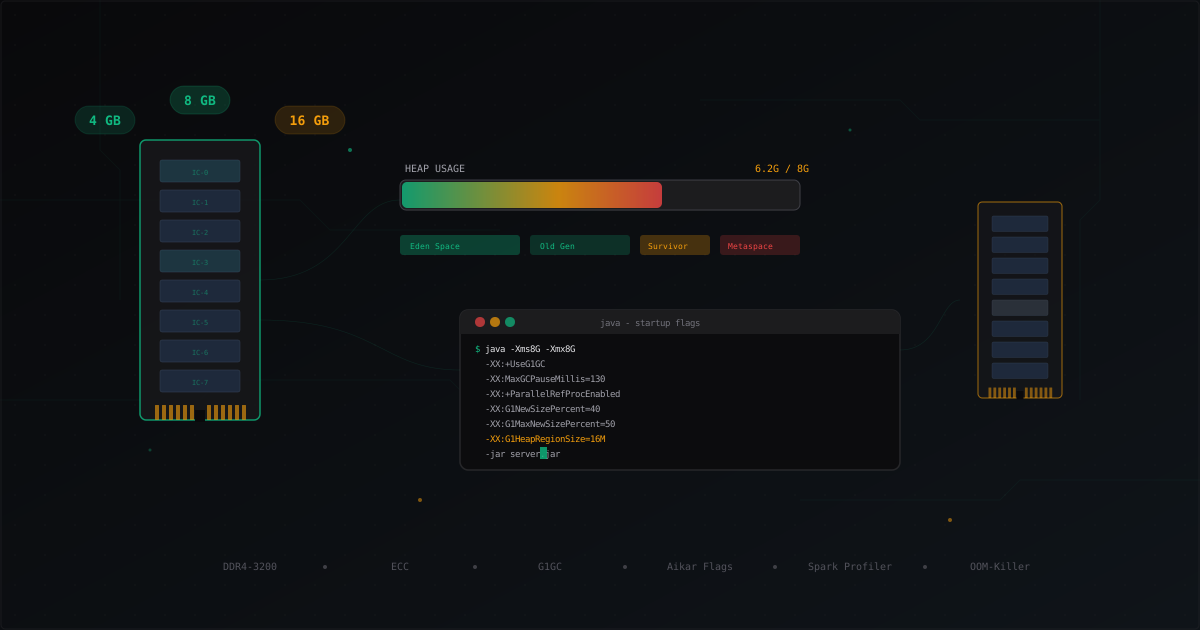
How Much RAM Does a Minecraft Server Need
"How much RAM do I need?" is the most common question in Minecraft server hosting. The standard answer is "it depends," which is technically correct but completely unhelpful. Let's break it down properly - with actual numbers, tables, and specific recommendations.
Base Requirements: Vanilla vs Modded
A vanilla Minecraft server on 1.20+ uses about 1-1.5 GB of RAM at startup. That's with zero players - just the world loading, spawn chunks, and core systems.
Paper/Spigot optimize memory usage and start with 800 MB - 1.2 GB under the same conditions. The difference is small at idle but grows significantly under load.
Forge with 30-50 mods starts at 2-3 GB. Heavy modpacks like All the Mods 9 or FTB Revelation easily demand 4-6 GB just to boot. Fabric sits somewhere in between - base consumption is closer to Paper, but mods like Create or Sodium push it up noticeably.
First rule: calculate from startup consumption, not from zero. A server that needs 2 GB to start will need very different numbers at 20 players compared to one starting at 800 MB.
RAM Per Player
There's no universal formula, but there are well-tested approximations.
For Paper/Spigot:
- Each player adds roughly 50-80 MB to consumption
- Loaded chunks are the main consumer, about 10-15 MB per chunk in memory
- Default view-distance=10 means 441 chunks per player (21x21)
- At view-distance=6, it's only 169 chunks - nearly 3x reduction
For Forge/Fabric with mods:
- Per player usage ranges from 100 to 300 MB depending on the modpack
- Mods with custom dimensions (RFTools Dimensions, Compact Machines) can spike consumption dramatically
- Tile entities from tech mods (Applied Energistics, Mekanism) are memory-hungry
Recommendation Table
| Players | Paper/Spigot | Forge (Light) | Forge (Heavy) | Fabric + Mods |
|---|---|---|---|---|
| 1-5 | 2-3 GB | 4-5 GB | 6-8 GB | 3-4 GB |
| 5-15 | 3-5 GB | 5-7 GB | 8-10 GB | 4-6 GB |
| 15-30 | 5-7 GB | 7-10 GB | 10-14 GB | 6-8 GB |
| 30-50 | 7-10 GB | 10-14 GB | 14-18 GB | 8-12 GB |
| 50-100 | 10-14 GB | - | - | 12-16 GB |
| 100+ | 14-20 GB | - | - | - |
Forge with heavy modpacks doesn't scale well beyond 30 players. That's not a RAM limitation - it's Java's single-threaded nature. More on that later.
These numbers assume standard configurations. If you've reduced view-distance to 6, disabled entity-tracking beyond 48 blocks, and configured Paper for aggressive chunk unloading, you can reduce these by 20-30%.
Why More RAM Isn't Always Better
A common misconception: "I'll buy 32 GB, allocate it all, and the server will fly." In practice, this creates a worse problem than running low on memory - long garbage collection pauses.
Java uses a garbage collector (GC) to clean up unused memory. With G1GC, the default collector used for Minecraft, GC periodically scans the entire allocated heap and removes objects that are no longer referenced.
The bigger the heap, the longer this scan takes. At 32 GB, a major GC can take 2-5 seconds. During this time, the server freezes. TPS drops to zero. Players see lag spikes. Everything stops until GC finishes.
At 8-12 GB, GC pauses typically stay within 50-150 ms - players won't even notice. This is the key insight: having enough memory is better than having too much.
Rule of thumb: allocate 15-25% more than your server actually uses under peak load. Not 2-3x more.
Aikar's JVM Flags Explained
Aikar (a Paper developer) compiled a set of JVM flags optimized specifically for Minecraft servers. These aren't magic - they tune G1GC parameters for Minecraft's specific workload patterns.
For servers with 8 GB or less:
java -Xms8G -Xmx8G \
  -XX:+UseG1GC \
  -XX:+ParallelRefProcEnabled \
  -XX:MaxGCPauseMillis=200 \
  -XX:+UnlockExperimentalVMOptions \
  -XX:+DisableExplicitGC \
  -XX:+AlwaysPreTouch \
  -XX:G1NewSizePercent=30 \
  -XX:G1MaxNewSizePercent=40 \
  -XX:G1HeapRegionSize=8M \
  -XX:G1ReservePercent=20 \
  -XX:G1MixedGCCountTarget=4 \
  -XX:InitiatingHeapOccupancyPercent=15 \
  -XX:G1MixedGCLiveThresholdPercent=90 \
  -XX:G1RSetUpdatingPauseTimePercent=5 \
  -XX:SurvivorRatio=32 \
  -XX:+PerfDisableSharedMem \
  -XX:MaxTenuringThreshold=1 \
  -jar server.jar
For servers with 12 GB or more:
java -Xms12G -Xmx12G \
  -XX:+UseG1GC \
  -XX:+ParallelRefProcEnabled \
  -XX:MaxGCPauseMillis=200 \
  -XX:+UnlockExperimentalVMOptions \
  -XX:+DisableExplicitGC \
  -XX:+AlwaysPreTouch \
  -XX:G1NewSizePercent=40 \
  -XX:G1MaxNewSizePercent=50 \
  -XX:G1HeapRegionSize=16M \
  -XX:G1ReservePercent=15 \
  -XX:G1MixedGCCountTarget=4 \
  -XX:InitiatingHeapOccupancyPercent=20 \
  -XX:G1MixedGCLiveThresholdPercent=90 \
  -XX:G1RSetUpdatingPauseTimePercent=5 \
  -XX:SurvivorRatio=32 \
  -XX:+PerfDisableSharedMem \
  -XX:MaxTenuringThreshold=1 \
  -jar server.jar
What the key flags do:
- -Xms and -Xmx set equal - allocates all memory upfront. JVM doesn't waste resources resizing the heap
- G1NewSizePercent=40 - increases the young generation. Minecraft creates tons of short-lived objects (packets, tick data, coordinates), and a larger young gen collects them cheaply
- G1HeapRegionSize=16M - larger regions for bigger heaps. Reduces management overhead
- MaxGCPauseMillis=200 - target pause time. GC will try to stay within this, but it's not a guarantee
- InitiatingHeapOccupancyPercent=20 - start background collection early to avoid emergency full GCs
- AlwaysPreTouch - physically allocate all memory at startup. Eliminates latency from first-access page faults
Important: -Xms and -Xmx must be equal. Setting -Xms2G -Xmx8G causes the JVM to constantly resize the heap, introducing additional latency.
Paper vs Forge vs Fabric: Memory Usage
Paper/Spigot/Purpur
The most memory-efficient option. Paper aggressively optimizes chunks, entities, and tile entities. Key settings that affect RAM:
paper.yml > max-auto-save-chunks-per-tick- limits concurrent chunk savesspigot.yml > view-distance- the single biggest lever for memory controlpaper.yml > delay-chunk-unloads-by- how quickly unused chunks are unloaded
With proper tuning, Paper can comfortably serve 30 players in 6 GB.
Forge
Forge servers consume more memory because of mods. Each mod adds its own classes, registries, and tile entities. Some specific examples:
- Applied Energistics 2 with a large ME network - up to 500 MB extra
- Mekanism with a full processing chain - 200-400 MB
- Custom dimensions (RFTools) - up to 1 GB per dimension
- Dynmap/BlueMap - 500 MB-2 GB depending on rendered area
Fabric
Fabric itself is lightweight - it's essentially a mod loader. Consumption depends entirely on installed mods. Lithium and Starlight reduce usage. Create and tech mods increase it. On average, Fabric is 15-25% more efficient than Forge with a comparable mod set.
Swap and the OOM-Killer
Swap
Swap is disk space that the system uses as "backup" memory. For a Minecraft server, swap is a disaster. When the JVM starts using swap, performance drops 100-1000x compared to RAM.
Recommendations:
- Never rely on swap as a memory source for your server
- Keep swap for system processes, but configure swappiness:
# Check current value
cat /proc/sys/vm/swappiness

# Set low swappiness (prefer RAM over swap)
sudo sysctl vm.swappiness=10

# Persist across reboots
echo 'vm.swappiness=10' | sudo tee -a /etc/sysctl.conf
With swappiness=10, the system will only use swap as a last resort. This keeps the Java process in physical RAM instead of paging to disk.
OOM-Killer
When the system runs critically low on memory, the Linux kernel invokes the OOM-killer, which terminates the process consuming the most RAM. That's usually your Minecraft server.
Signs of OOM-killer activity:
# Check if a process was killed
dmesg | grep -i "out of memory"
dmesg | grep -i "oom-kill"

# View current OOM score for the process
cat /proc/$(pidof java)/oom_score
Protecting against OOM:
- Don't allocate more than 80% of available RAM to the server
- Leave 1-2 GB for the OS, disk cache, and other processes
- If your VPS has 8 GB - allocate 6 GB maximum to the server
Example: VPS with 16 GB RAM. System and basic services use ~1 GB. Disk cache needs ~1-2 GB. That leaves 12-13 GB for Minecraft.
Monitoring RAM with spark
spark is a profiler for Minecraft servers that shows detailed, real-time memory usage. Install it as a plugin (Paper) or mod (Forge/Fabric).
Basic commands:
/spark health         - general server info
/spark heapdump       - full heap dump for analysis
/spark heapsummary    - brief memory usage summary
/spark gc             - garbage collector statistics
What to watch for:
GC frequency: if minor GC runs every 2-3 seconds, that's normal. If major GC happens more than once per minute, you're running low on memory or young gen is too small.
GC pause duration: minor GC should be 10-50 ms. Major GC should be 100-300 ms. If major GC takes over 500 ms, the heap is too large or GC settings need tuning.
Heap usage after GC: if more than 80% of the heap is used after a major GC, you genuinely need more memory. Time to scale up or optimize.
Top consumers: heapsummary shows which objects use the most space. It's usually chunks, Entity, TileEntity, or plugin/mod data.
Automated monitoring:
/spark health --memory
This shows current usage, session peak, and average. Record readings during peak player counts - that's your actual baseline for RAM allocation.
When You Need More CPU, Not RAM
This is a common mistake: the server lags, the admin adds RAM, nothing changes. Because the problem was CPU all along.
The Minecraft server is single-threaded in its main tick loop. One tick = 50 ms (20 TPS). If a tick can't complete in 50 ms, TPS drops. RAM is irrelevant in this scenario.
Symptoms of CPU bottleneck:
- TPS below 20, but RAM usage is at 50-60%
- spark profiler shows most time spent in entityTick, chunkTick, or pluginTick
- Adding RAM doesn't improve TPS
Symptoms of RAM shortage:
- Frequent and long GC pauses
- TPS periodically drops to 0-5 for a second or two, then recovers
spark gcshows major GC every 10-30 seconds- Server crashes with OutOfMemoryError
What to do if CPU is the bottleneck:
- Switch to hosting with a faster single-core processor (clock speed matters more than core count)
- Reduce view-distance (reduces both CPU and RAM load)
- Optimize plugins/mods - some are excessively heavy in the tick loop
- Use Paper/Purpur instead of Spigot - many operations are moved to async threads
Practical Tips
- Start small. Set 4 GB, monitor with spark for a week. Increase by 2 GB increments if needed
- -Xms = -Xmx. Always. No exceptions
- Don't forget the OS. The JVM isn't the only process on the machine
- View-distance is the most powerful lever. Reducing from 10 to 7 saves up to 40% RAM
- Pregenerate the world. Real-time chunk generation is expensive in both CPU and RAM
- Restart daily. Java servers tend to leak memory through plugins. A daily restart at 5 AM during low player counts is standard practice
- Monitor, don't guess. spark is free. Use it
Protect Your Server from DDoS Attacks
Free protection with 5-minute setup. 1 TB bandwidth included.
Try for FreeRelated Articles
After a DDoS Attack: How to Recover Your Minecraft Server and Prevent Repeats
Step-by-step guide to recovering a Minecraft server after a DDoS attack: data integrity checks, log analysis, IP rotation, protection setup, and a post-mortem template for admins.
Best Minecraft Server Mods 2026: Forge, Fabric, and What to Install
Curated list of server-side Minecraft mods for 2026: performance, world gen, gameplay, utilities. Forge and Fabric covered separately with versions and compatibility tips.
Jobs Reborn: setting up RPG jobs on a Minecraft server (2026)
A full walk-through of Jobs Reborn 5.x in 2026: Vault install, Miner and Woodcutter configs, XP and payment formulas, placed-block anti-abuse, and /jobs reward shops.