Velocity + DDoS Protection: Complete Guide to a Secure Minecraft Network
Why Velocity Over BungeeCord
If you're building a multi-server Minecraft network, you need a proxy. BungeeCord was the standard for years, but in 2024-2026 the choice is clear: Velocity by PaperMC.
Here's why BungeeCord is showing its age:
- Performance. Velocity was written from scratch on a modern Java stack. It uses less memory and handles more connections on the same hardware.
- Security. BungeeCord still relies on legacy ip-forwarding. Velocity offers modern forwarding with HMAC signatures, which prevents UUID spoofing entirely.
- API. Velocity has a clean event-driven API without legacy baggage. Plugins are more stable.
- Maintenance. PaperMC actively develops Velocity. BungeeCord gets rare updates.
The only argument for BungeeCord is compatibility with ancient plugins. But most actively maintained plugins have already been ported to Velocity.
Architecture: How Everything Fits Together
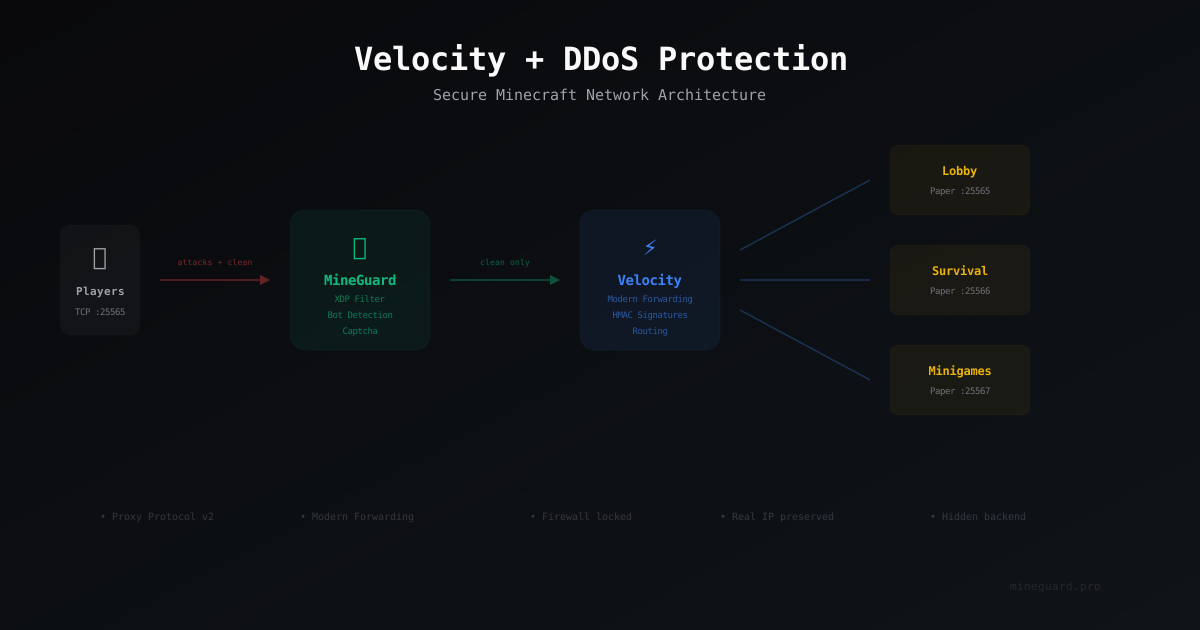
A properly designed Minecraft network with DDoS protection looks like this:
Player → MineGuard (filtering) → Velocity (proxy) → Paper servers (lobby, survival, minigames)
Let's break down each layer:
MineGuard accepts all incoming traffic. Players connect to MineGuard's IP address, not your actual server. All filtering happens before packets reach Velocity. Bots, flood, malformed packets - everything gets filtered at this stage.
Velocity receives clean traffic and routes players between servers. It handles server switching (hub → survival → minigames) and forwards player data.
Paper servers are the endpoints where gameplay happens. Each server only knows about Velocity and has no direct exposure to the outside world.
The critical point: your real server IP (where Velocity runs) must stay hidden. If an attacker discovers the direct address, they bypass MineGuard and hit you directly.
Installing and Configuring Velocity
Requirements
- Java 17+ (Java 21 recommended)
- Minimum 512 MB RAM for the proxy (for 100-200 players)
- Linux server (Ubuntu 22.04 / Debian 12)
Installation
mkdir -p /opt/velocity && cd /opt/velocity
wget https://api.papermc.io/v2/projects/velocity/versions/3.4.0-SNAPSHOT/builds/latest/downloads/velocity-3.4.0-SNAPSHOT-latest.jar -O velocity.jar
java -Xms512M -Xmx512M -jar velocity.jar
After the first launch, Velocity creates its configuration files. Stop the server and proceed to configuration.
velocity.toml - Key Settings
bind = "0.0.0.0:25577"

# Switch to modern - this is critical
player-info-forwarding-mode = "modern"

show-max-ping = 1000
online-mode = true

[servers]
lobby = "127.0.0.1:25565"
survival = "127.0.0.1:25566"
minigames = "127.0.0.1:25567"

try = ["lobby"]

[forced-hosts]
"survival.example.com" = ["survival"]

[advanced]
connection-timeout = 5000
read-timeout = 30000
haproxy-protocol = false
The bind parameter sets the address and port Velocity listens on. If MineGuard and Velocity are on the same machine, use 127.0.0.1:25577. If on different machines, use 0.0.0.0:25577, but make sure to firewall the port from everything except MineGuard.
Modern Forwarding
After enabling player-info-forwarding-mode = "modern", Velocity generates a forwarding.secret file. Copy this secret to every Paper server.
On Paper servers, open config/paper-global.yml:
proxies:
  velocity:
    enabled: true
    online-mode: true
    secret: "paste_the_secret_from_forwarding.secret_here"
Modern forwarding signs player data (UUID, skin, IP) with an HMAC key. If anyone tries to connect to a Paper server directly, bypassing Velocity, the server rejects the connection. This closes an entire class of UUID spoofing attacks.
Firewall: Lock Down Everything
A firewall isn't optional - it's a mandatory part of the setup. Without it, your Paper servers are exposed and accept direct connections.
# Allow SSH
sudo ufw allow 22/tcp

# Allow Velocity ONLY from MineGuard IP
sudo ufw allow from MINEGUARD_IP to any port 25577 proto tcp

# Deny direct access to Paper servers from outside
# (they're on 127.0.0.1 so already unreachable, but just in case)
sudo ufw deny 25565:25570/tcp

# Enable firewall
sudo ufw enable
Replace MINEGUARD_IP with the IP address of your MineGuard filter. If our filter has multiple IPs, add a rule for each one.
Verify that Paper server ports are bound to 127.0.0.1, not 0.0.0.0. In each server's server.properties:
server-ip=127.0.0.1
server-port=25565
Connecting MineGuard DDoS Protection
How MineGuard Filters Traffic
MineGuard operates as a reverse proxy in front of Velocity. All incoming traffic passes through the filter, which analyzes packets at multiple levels:
- XDP level - the fastest. Drops junk traffic before it even reaches the OS network stack.
- TCP level - validates connections, blocks SYN floods and anomalous packets.
- Minecraft protocol level - inspects packet contents. Distinguishes bots from real players by their connection behavior.
For players, it's transparent: they connect to an address, see the MOTD, join the server. The difference is that a filter sits between the player and Velocity, blocking attacks before they arrive.
Setup in MineGuard Panel
- Add a network in the MineGuard panel
- Enter the backend address - IP and port of your Velocity (
your_server:25577) - Select a protection mode ("Smart" is recommended to start)
- MineGuard will assign you a protected IP - this is the address you give to players
Proxy Protocol
When traffic passes through MineGuard, Velocity sees MineGuard's IP address by default, not the player's real IP. Proxy Protocol solves this problem.
Enable Proxy Protocol for your network in the MineGuard panel.
In velocity.toml, enable support:
[advanced]
haproxy-protocol = true
After this, Velocity will correctly see player IP addresses. This matters for:
- IP ban lists
- Geolocation
- Alt-account detection
- Accurate statistics
Important: after enabling haproxy-protocol in Velocity, direct connections (bypassing MineGuard) will stop working. Velocity will expect a Proxy Protocol header from every connection. This is another layer of protection - even if someone finds your direct IP, they can't connect without Proxy Protocol.
Systemd Service for Velocity
To make Velocity start automatically on server reboot:
# /etc/systemd/system/velocity.service
[Unit]
Description=Velocity Minecraft Proxy
After=network.target

[Service]
User=minecraft
WorkingDirectory=/opt/velocity
ExecStart=/usr/bin/java -Xms512M -Xmx512M -XX:+UseG1GC -XX:G1HeapRegionSize=4M -XX:+UnlockExperimentalVMOptions -XX:+ParallelRefProcEnabled -jar velocity.jar
Restart=on-failure
RestartSec=10
StandardOutput=journal
StandardError=journal

[Install]
WantedBy=multi-user.target
sudo systemctl daemon-reload
sudo systemctl enable velocity
sudo systemctl start velocity
Testing
Before giving the address to players, run through this checklist:
1. Test connection through MineGuard:
Connect to the protected IP from a Minecraft client. You should land on the lobby server.
2. Verify modern forwarding:
Join the server and run /velocity dump. Confirm that forwarding mode is "modern". On the Paper server, check that your UUID is correct (matches your Mojang UUID).
3. Verify Proxy Protocol:
On the Paper server, run a command that shows your IP (e.g., EssentialsX: /whois your_name). The IP should be your real one, not MineGuard's address.
4. Test the firewall:
Try connecting directly to your server IP on port 25577, bypassing MineGuard. The connection should be refused or time out.
# From an external machine
nc -zv your_server 25577
# Should timeout or refuse
5. Test direct Paper access:
Try connecting with a Minecraft client directly to a Paper server address. The connection should be rejected (modern forwarding won't allow it).
Monitoring
A configured network needs monitoring. Here's what to watch:
In the MineGuard Panel
- Traffic graphs - sudden spikes indicate an attack
- Blocked connections - show attack intensity
- Latency - time between MineGuard and your Velocity
On the Server
# Number of active connections to Velocity
ss -tn state established '( dport = :25577 )' | wc -l

# Resource usage
journalctl -u velocity -f

# Network traffic
vnstat -l -i eth0
Velocity Logs
You can adjust the logging level in velocity.toml. Keep the default level for production, but switch to debug when diagnosing issues.
It's worth setting up alerts: if connection counts suddenly drop or spike, something is wrong. The simplest approach is a cron script that checks Velocity availability and sends a notification to Telegram or Discord.
Common Mistakes
"Connection lost" when joining. Usually a modern forwarding issue. Verify that the secret in paper-global.yml matches forwarding.secret and that the mode is set to "modern" on both sides.
Player IPs show up as MineGuard's IP. Proxy Protocol isn't enabled. Turn it on in the MineGuard panel and in velocity.toml.
Velocity won't start with haproxy-protocol = true. This is expected if you're connecting directly. With Proxy Protocol enabled, connections without a PROXYv2 header are rejected. Connect only through MineGuard.
Players join but can't switch between servers. Check that all servers in [servers] are reachable from the Velocity machine. Use ping and nc to diagnose.
Summary
MineGuard + Velocity is a production-grade solution for Minecraft networks of any scale. MineGuard handles DDoS filtering at the network level, Velocity manages player routing, and Paper servers handle gameplay.
Key takeaways:
- Use modern forwarding, not legacy
- Firewall all ports except those strictly needed
- Enable Proxy Protocol for correct IP forwarding
- Hide your real server IP - it should never appear in DNS or public records
- Monitor traffic and connections
This architecture withstands serious DDoS attacks while adding negligible latency for players. XDP-level filtering is faster than any software solution in user space, and Velocity provides minimal overhead when proxying traffic.
Protect Your Server from DDoS Attacks
Free protection with 5-minute setup. 1 TB bandwidth included.
Try for FreeRelated Articles
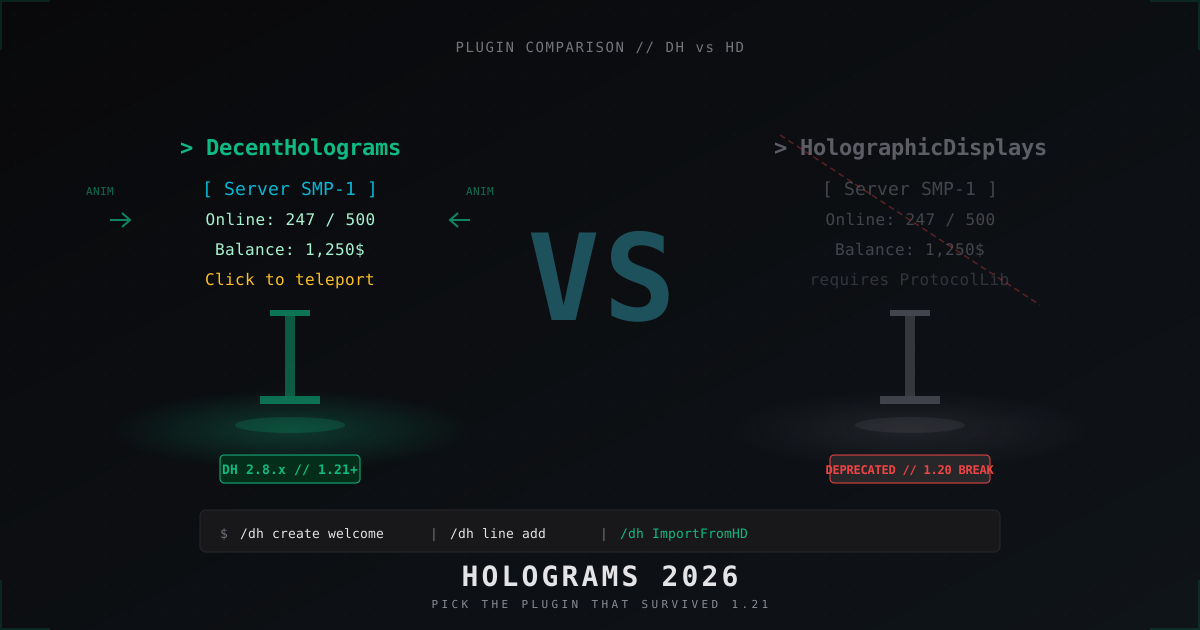
DecentHolograms vs Holographic Displays: which hologram plugin to use in 2026
Holographic Displays was the standard for a decade, then it broke on 1.20+ thanks to its ProtocolLib chain. DecentHolograms runs without it and is now the default pick. We compare features, migration and real configs.
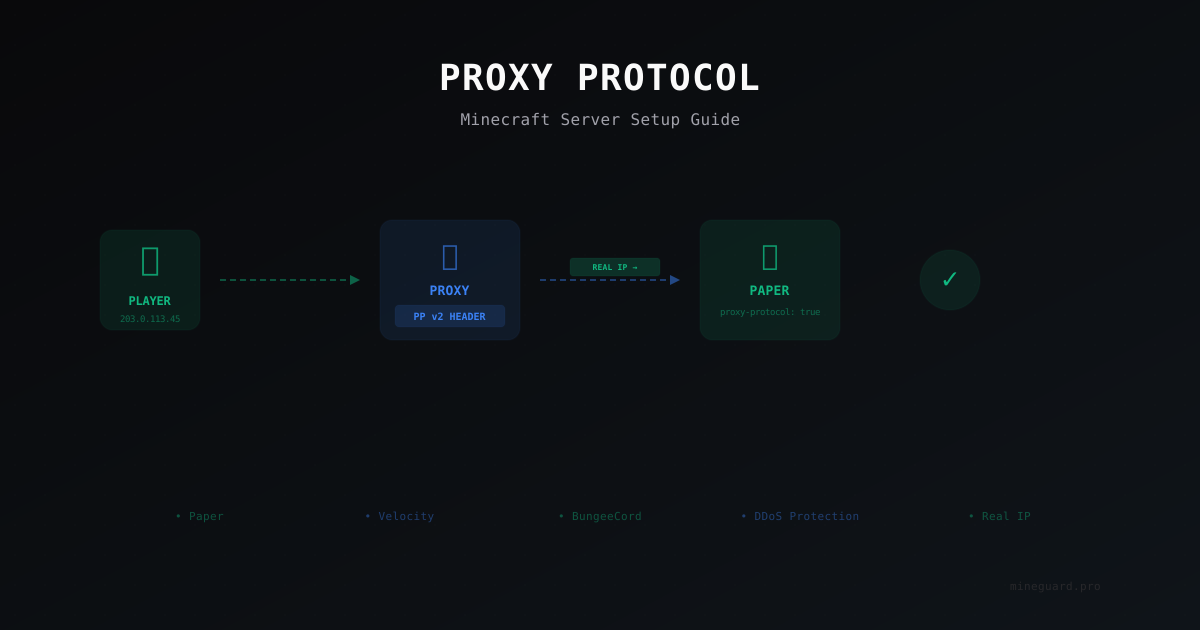
Proxy Protocol for Minecraft: Why You Need It and How to Set It Up
Proxy Protocol preserves real player IP addresses when your server runs behind a reverse proxy or DDoS protection. Learn how to configure it for Paper, Velocity, and DDoS mitigation setups.
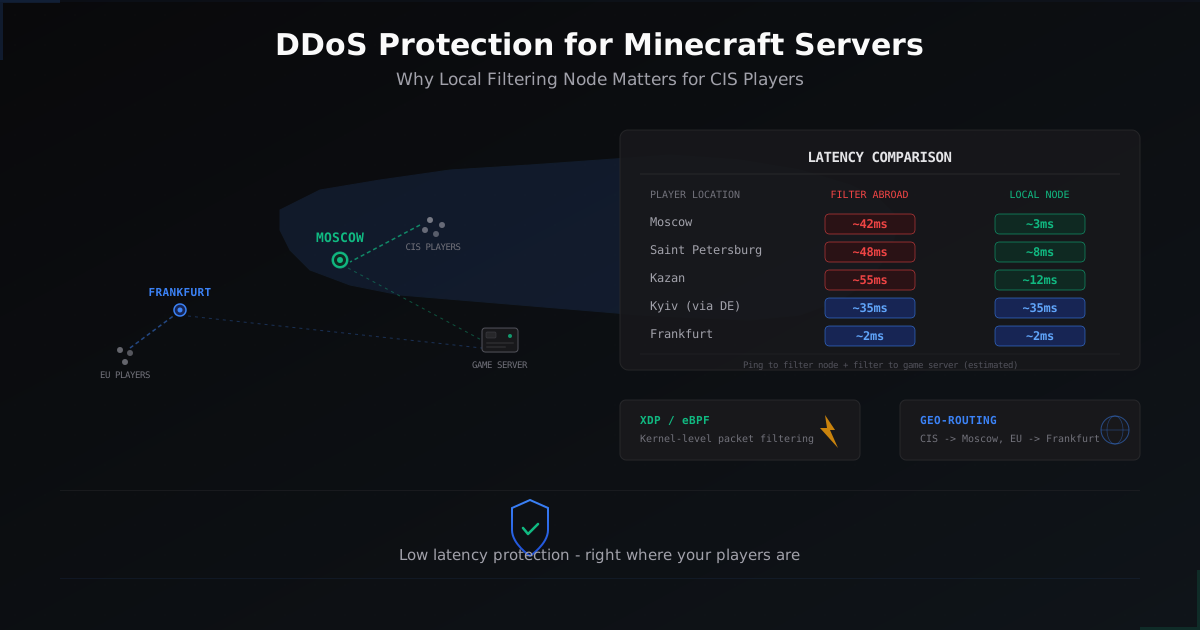
DDoS Protection for Minecraft Servers in Russia - Why Local Filtering Matters
Why routing traffic through Europe adds 30-40ms for every CIS player, how it affects PvP gameplay, and what changes with a local Moscow filtering node.