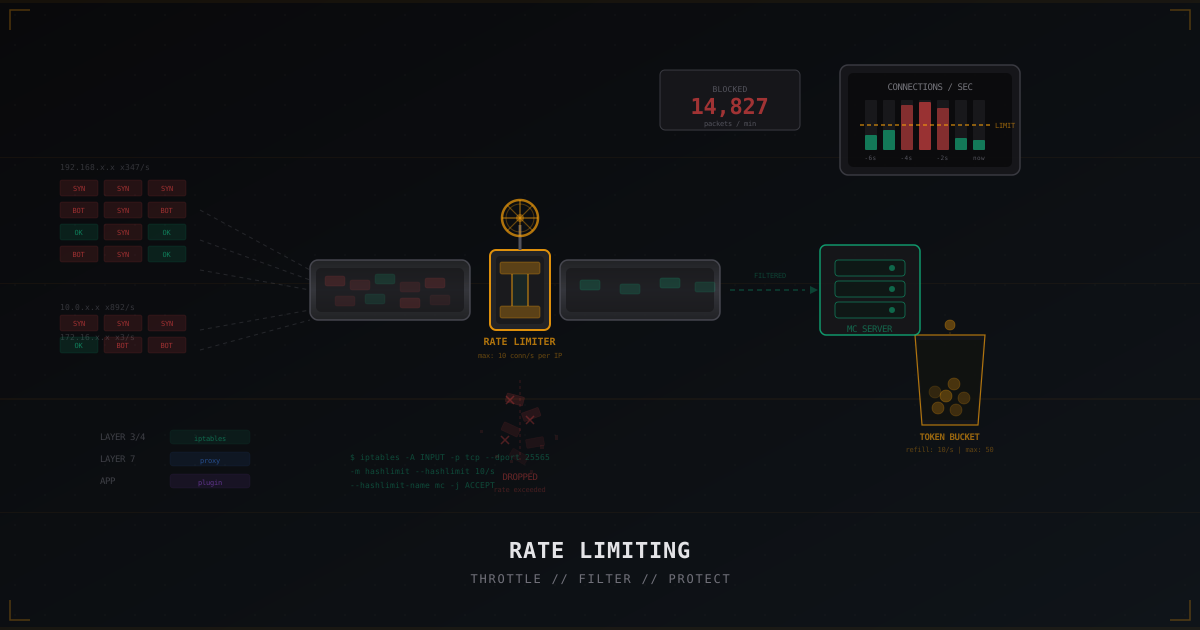
Rate Limiting for Minecraft: Controlling Malicious Connections
A bot attack on a Minecraft server is straightforward: hundreds of connections per second from different IPs. Each bot establishes a TCP connection, sends a handshake, sometimes even completes login. The server spends resources on every connection and eventually stops responding to real players.
Rate limiting tackles this head-on: if more than N connections per second come from one IP, the extras get dropped. Simple, blunt, effective. But the details matter. A misconfigured rate limiter blocks legitimate players. One that is too lenient fails to stop anything.
This article covers every layer of rate limiting for Minecraft: from iptables to plugins. With actual configs and explanations of why specific values work.
What is rate limiting
Rate limiting is a mechanism that controls request frequency. Instead of deciding whether a request is good or bad (that is the job of a firewall or antibot), a rate limiter just counts: how many requests came from this source in a given time window. Exceed the threshold, get rejected.
This works because a normal player connects once. Maybe twice if they crashed and reconnected. Ten times per minute is suspicious. A hundred times per second is definitely a bot.
Rate limiting operates at different levels:
- Network level (L3/L4): iptables, nftables. Counts TCP connections and packets. Fastest, runs in kernel space.
- Proxy level (L7): Velocity, BungeeCord, Waterfall. Counts Minecraft connections. Understands the protocol, can distinguish handshake from login.
- Application level: plugins on the game server itself. Most flexible but most resource-intensive.
The best defense combines all three. Each layer catches a different type of attack.
server.properties: the built-in rate-limit
There is a rate-limit parameter in server.properties that few people know about:
# server.properties
rate-limit=0
Default is 0 (disabled). When set, the server disconnects clients that send more than the specified number of packets per second.
# Reasonable value for most servers
rate-limit=500
500 packets per second is plenty for a normal player. Regular gameplay generates 20-50 packets per second (movement, interaction, chat). Even intense PvP rarely exceeds 200. But bots using packet spam easily hit thousands.
Limitations
This only works after the connection is established. Bots that spam connections without sending packets bypass it entirely. For connection flood protection, you need other tools.
On Paper, this parameter is effectively replaced by the built-in packet limiter:
# paper-global.yml
packet-limiter:
  kick-message: '<red><lang:disconnect.exceeded_packet_rate>'
  limits:
    all:
      interval: 7.0
      max-packet-rate: 500.0
    ServerboundCommandSuggestionPacket:
      interval: 1.0
      max-packet-rate: 15.0
Paper's implementation is more flexible: you can set limits per packet type. Tab-complete spam? Limit ServerboundCommandSuggestionPacket to 15 per second.
iptables: kernel-level rate limiting
iptables is the most powerful rate limiting tool on Linux. It runs in the kernel, does not consume userspace resources, and processes packets before they reach the Java process.
If you are new to iptables, read our guide to iptables for Minecraft.
connlimit: limiting concurrent connections
The connlimit module restricts the number of simultaneous TCP connections from a single IP.
# Max 3 concurrent connections to port 25565 from one IP
iptables -A INPUT -p tcp --dport 25565 \
  -m connlimit --connlimit-above 3 \
  -j DROP
Why 3? A player normally has one active connection. Two if reconnecting (the old one has not closed yet). Three is a safety margin. A bot attack from one IP creates dozens or hundreds of connections, and connlimit cuts everything above the threshold.
For BungeeCord/Velocity networks where the proxy connects to backend servers, whitelist the proxy IP:
# Allow proxy without limits
iptables -A INPUT -p tcp --dport 25565 -s 10.0.0.1 -j ACCEPT

# Limit everyone else
iptables -A INPUT -p tcp --dport 25565 \
  -m connlimit --connlimit-above 3 \
  -j DROP
hashlimit: limiting connection rate
connlimit caps concurrent connections but not the rate of creating new ones. A bot can create and close connections faster than connlimit tracks them. That is where hashlimit comes in.
# Max 10 new connections per second from one IP
iptables -A INPUT -p tcp --dport 25565 --syn \
  -m hashlimit \
  --hashlimit-name minecraft \
  --hashlimit-above 10/sec \
  --hashlimit-burst 20 \
  --hashlimit-mode srcip \
  --hashlimit-htable-expire 30000 \
  -j DROP
Breaking down the parameters:
--syn: only count SYN packets (new connection attempts)--hashlimit-above 10/sec: threshold of 10 connections per second--hashlimit-burst 20: allow bursts up to 20 (for legitimate reconnects)--hashlimit-mode srcip: count separately per IP--hashlimit-htable-expire 30000: expire entries after 30 seconds of inactivity
10 connections per second is generous for one player. Even with bad connectivity and constant reconnects, a real player will not hit this. But a bot generating hundreds of connections gets stopped immediately.
Combining rules
In practice, you combine multiple rules:
# 1. Allow localhost and trusted IPs
iptables -A INPUT -i lo -j ACCEPT
iptables -A INPUT -p tcp --dport 25565 -s 10.0.0.1 -j ACCEPT

# 2. Allow established connections
iptables -A INPUT -m state --state ESTABLISHED,RELATED -j ACCEPT

# 3. Limit concurrent connections
iptables -A INPUT -p tcp --dport 25565 \
  -m connlimit --connlimit-above 3 -j DROP

# 4. Limit new connection rate
iptables -A INPUT -p tcp --dport 25565 --syn \
  -m hashlimit \
  --hashlimit-name minecraft \
  --hashlimit-above 10/sec \
  --hashlimit-burst 20 \
  --hashlimit-mode srcip \
  -j DROP

# 5. Accept the rest
iptables -A INPUT -p tcp --dport 25565 -j ACCEPT
Order matters. First pass trusted traffic, then filter by count, then by rate. Each rule strips away a layer of junk.
Velocity: connection throttle
If you use Velocity as your proxy (and you should for any multi-server network), it has a built-in connection throttling mechanism.
# velocity.toml
[advanced]
connection-timeout = 5000
login-ratelimit = 3000
login-ratelimit is the minimum time (milliseconds) between connection attempts from one IP. A value of 3000 means one connection every 3 seconds per IP.
For servers with many players behind NAT (schools, internet cafes), you can lower it to 1000 (one connection per second). For smaller servers, 3000-5000 is a good balance.
BungeeCord connection_throttle
BungeeCord has an equivalent setting:
# config.yml (BungeeCord)
connection_throttle: 4000
connection_throttle_limit: 3
Waterfall
Waterfall (PaperMC's BungeeCord fork) uses the same settings with some additions:
# waterfall.yml
connection_throttle: 4000
throttle: 4000
If you are still on BungeeCord, consider switching to Velocity. It is faster, more secure, and handles rate limiting better.
Token bucket: the algorithm behind it all
Most rate limiters use the token bucket algorithm. The idea is simple:
- Each IP has a "bucket" filled with tokens
- Each request consumes one token
- Tokens are added to the bucket at a fixed rate (e.g., 10 per second)
- The bucket has a maximum capacity (e.g., 50 tokens)
- When no tokens remain, the request is rejected
Why is this better than a simple counter of "N requests per second"? Because token bucket handles bursts. If a player has not connected for 5 seconds, their bucket is full (50 tokens). They can quickly reconnect 10 times in a row and all connections go through. Meanwhile, a bot generating constant traffic drains its bucket fast.
Pseudocode example:
bucket_size = 50        # max tokens
refill_rate = 10        # tokens per second
tokens = bucket_size    # start with a full bucket

function handle_request(ip):
    bucket = get_bucket(ip)
    bucket.refill()     # add tokens for elapsed time

    if bucket.tokens > 0:
        bucket.tokens -= 1
        return ACCEPT
    else:
        return DROP
The hashlimit module in iptables works on a similar principle. --hashlimit-burst is the bucket size, and --hashlimit-above is the refill rate (inverted: it is the threshold above which blocking begins).
Plugins for rate limiting
LimboFilter
LimboFilter is a Velocity plugin that creates a lightweight "lobby" before the main server. New connections land on a minimal limbo server where they pass verification (captcha, falling check) before being forwarded to the actual game server.
Rate limiting here operates at the Minecraft protocol level. LimboFilter counts connections, tracks repeated attempts, and can block IPs that try too frequently.
More on captcha protection in our article about captcha for Minecraft.
BotSentry
BotSentry is a BungeeCord/Velocity plugin specializing in bot defense. It includes rate limiting as one of its features:
- Connection-per-second limits (global and per-IP)
- Automatic IP blocking when thresholds are exceeded
- External blocklist integration
- Configurable actions (kick, tempban, captcha)
Tuning: how to avoid blocking your own players
Rate limiting is a balancing act. Too strict and you lock out real players. Too loose and it stops nothing. Here are situations that need special attention.
Server launches
When you announce a new server opening and 500 players show up at once, a standard rate limiter might block half of them. Solutions:
- Temporarily raise limits. Before launch, increase
hashlimit-burstandhashlimit-above. Restore defaults after things stabilize. - Use a queue. LimboFilter can create a queue, letting players in gradually.
- Staged launch. Start with invites, then open to everyone.
NAT and shared IPs
In schools, dorms, and internet cafes, multiple players share one IP. A connlimit of 3 blocks the fourth player. Solutions:
- Raise connlimit to 10-15 for these scenarios
- Whitelist known institutional IPs
- Rely more on hashlimit (rate) than connlimit (count)
Mobile internet players
Mobile connections frequently change IPs, and a player might land on an IP recently used by a bot. If you use long bans (30 minutes or more), a mobile player can get blocked by inheritance.
Solution: use short TTLs for blocks. 60-120 seconds is enough to stop an active attack without trapping an innocent mobile player.
Whitelisting trusted IPs
Some IPs should never be rate limited:
# Proxy servers
iptables -I INPUT -p tcp --dport 25565 -s 10.0.0.1 -j ACCEPT
iptables -I INPUT -p tcp --dport 25565 -s 10.0.0.2 -j ACCEPT

# Monitoring (uptime checks)
iptables -I INPUT -p tcp --dport 25565 -s 1.2.3.4 -j ACCEPT
Rules with -I (insert) go to the top of the chain, processed before rate limiting rules. This is critical: if your proxy hits a hashlimit rule, every player loses their connection.
Rate limiting across layers
The most effective strategy applies rate limiting at every level with different logic:
Network level (iptables): limit TCP SYN packets and concurrent connections. Goal: block raw connection floods before they reach Java.
Proxy level (Velocity): limit Minecraft login attempts and repeated connections. Goal: stop bots that passed TCP handshake but are not real players.
Application level (plugins): limit in-game actions (commands, chat, interactions). Goal: catch bots that passed login but behave abnormally.
Each level catches its own threat type. iptables stops SYN floods. Velocity stops connection spam. Plugins stop packet abuse.
Rate limiting and DDoS protection
Rate limiting is part of DDoS protection, but not all of it. Against a serious DDoS attack (tens of gigabits of traffic), rate limiting on the server is pointless: the pipe is full, packets do not arrive.
For serious protection, you need network-level filtering before your server. MineGuard filters traffic at the network level, dropping junk packets before they reach your machine. Rate limiting on the server acts as the second line of defense: catching whatever gets through the network filter.
Together they form layered protection:
- DDoS filter (MineGuard): stops volumetric attacks at network level
- iptables rate limiting: throttles connection rates that pass the filter
- Proxy rate limiting: filters at the Minecraft protocol level
- Plugin rate limiting: protects against in-game abuse
More on bot attacks and defense methods in our article about bot attacks on Minecraft.
Monitoring effectiveness
Rate limiting is useless if you do not know whether it is working. Here is what to monitor:
iptables counters
# Show rule counters
iptables -L -n -v | grep hashlimit
Every iptables rule has a packet and byte counter. If your hashlimit rule shows thousands of drops, it is working. If zero, either there are no attacks or the rule is not triggering (check rule order).
Logging blocked traffic
# Log before dropping (throttle logging to avoid filling disk)
iptables -A INPUT -p tcp --dport 25565 --syn \
  -m hashlimit --hashlimit-above 10/sec \
  --hashlimit-burst 20 --hashlimit-name mc_syn \
  --hashlimit-mode srcip \
  -m limit --limit 5/min \
  -j LOG --log-prefix "MC_RATELIMIT: "
Note the -m limit --limit 5/min on the LOG rule. Without it, heavy attacks generate thousands of log entries per second, killing disk I/O and CPU.
Velocity stats
Velocity logs throttled connections to stdout:
[INFO] [ratelimiter] Connection from 1.2.3.4 throttled
Parse these logs for monitoring. Mass throttling from different IPs means a bot attack. From one IP means a persistent bot or a player with connection issues.
Quick reference
Minimum rate limiting setup for a Minecraft server:
iptables:
# Whitelist proxy (if applicable)
iptables -I INPUT -p tcp --dport 25565 -s YOUR_PROXY_IP -j ACCEPT

# Concurrent connection limit
iptables -A INPUT -p tcp --dport 25565 \
  -m connlimit --connlimit-above 5 -j DROP

# New connection rate limit
iptables -A INPUT -p tcp --dport 25565 --syn \
  -m hashlimit --hashlimit-name mc \
  --hashlimit-above 10/sec --hashlimit-burst 25 \
  --hashlimit-mode srcip -j DROP
Velocity:
[advanced]
login-ratelimit = 3000
Paper:
packet-limiter:
  limits:
    all:
      interval: 7.0
      max-packet-rate: 500.0
This covers the basics. From here, tune thresholds for your load: monitor counters, check logs, adjust values.
Common mistakes
connlimit too low. A connlimit of 1 blocks players who reconnect (old connection still in TIME_WAIT). Minimum should be 3.
Forgotten whitelist. Proxy hits the rate limit, all players lose connection. Always whitelist your proxy.
No burst. hashlimit without burst blocks any short spike. Player joins, crashes, rejoins: blocked. A burst of 15-25 fixes this.
Rate limit on ESTABLISHED. Apply rate limiting only to new connections (--syn), or you throttle already-connected players.
Global limit without per-IP. A global limit of "100 connections per second total" blocks everyone when one IP generates 100 connections. Always use per-IP limits.
Rate limiting is not a silver bullet. It is one layer in a multi-layered defense. But without it, the other layers work worse. Set up the basics, monitor effectiveness, and adjust as needed.
Global vs per-IP rate limiting
An important distinction that many people miss. A global rate limiter caps the total number of connections to your entire server. A per-IP rate limiter counts connections separately for each source IP.
A global limit is useful as an "emergency brake." If your server supports 200 players, there is no reason to accept 10,000 connections per second. A global cap of 500-1,000 connections per second protects against distributed attacks where thousands of IPs each send 1-2 connections, and per-IP limits never trigger.
Example of a global limit:
# Global limit: no more than 200 new connections per second total
iptables -A INPUT -p tcp --dport 25565 --syn \
  -m hashlimit \
  --hashlimit-name mc_global \
  --hashlimit-above 200/sec \
  --hashlimit-burst 300 \
  --hashlimit-mode dstip \
  -j DROP
The key difference: --hashlimit-mode dstip instead of srcip. Now iptables counts all connections to our IP rather than from each individual source.
Combining both types gives maximum protection:
- Per-IP limits catch bots spamming from a single address
- Global limits catch distributed attacks from thousands of IPs
Adaptive rate limiting
Static limits work but are not ideal. On an empty server at night, 10 connections per second from one IP is clearly a bot. On a busy Saturday evening with 300 players online, spiky traffic might be normal.
A simple approach to dynamic rate limiting:
#!/bin/bash
# adaptive-ratelimit.sh
# Run via cron every 5 minutes

CURRENT_PLAYERS=$(mc-rcon list | grep -o '[0-9]* players' | cut -d' ' -f1)

if [ "$CURRENT_PLAYERS" -gt 200 ]; then
    RATE=20; BURST=40
elif [ "$CURRENT_PLAYERS" -gt 50 ]; then
    RATE=15; BURST=30
else
    RATE=8; BURST=15
fi

# Update rules (remove old, add new)
iptables -D INPUT -p tcp --dport 25565 --syn \
  -m hashlimit --hashlimit-name mc_adaptive \
  --hashlimit-above ${RATE}/sec --hashlimit-burst ${BURST} \
  --hashlimit-mode srcip -j DROP 2>/dev/null

iptables -A INPUT -p tcp --dport 25565 --syn \
  -m hashlimit --hashlimit-name mc_adaptive \
  --hashlimit-above ${RATE}/sec --hashlimit-burst ${BURST} \
  --hashlimit-mode srcip -j DROP
This is a basic example. In production, consider using fail2ban or a custom daemon that analyzes logs in real time and adjusts rules accordingly.
GeoIP-based rate limiting
If 95% of your players are from one region and bot attacks come from IPs in distant countries, you can apply stricter rate limiting by geography:
# Install geoip module for iptables
# Ubuntu/Debian: apt install xtables-addons-common

# Strict limit for non-local countries
iptables -A INPUT -p tcp --dport 25565 --syn \
  -m geoip ! --src-cc US,CA,GB,DE \
  -m hashlimit --hashlimit-name mc_foreign \
  --hashlimit-above 3/sec --hashlimit-burst 5 \
  --hashlimit-mode srcip -j DROP
Be careful with this approach: GeoIP databases are imperfect, and you might block players using VPNs for lower latency. Use it as an additional filter, not a primary one.
Protect Your Server from DDoS Attacks
Free protection with 5-minute setup. 1 TB bandwidth included.
Try for FreeRelated Articles
Why Your Minecraft Server Keeps Crashing: Complete Troubleshooting Guide
A practical guide to diagnosing and fixing Minecraft server crashes. Learn to read crash reports, fix out-of-memory errors, repair corrupted chunks, resolve plugin conflicts, and handle entity overload.
TAB plugin: tab list, scoreboard and BossBar customization (2026)
One plugin covers tab list, scoreboard, BossBar, name-tags and LuckPerms prefixes. We walk through TAB by NEZNAMY: install, proxy mode, sorting, anti-override and real config.yml snippets.

Free vs Paid DDoS Protection: What's the Real Difference
An honest comparison of free and paid solutions for protecting game servers. We examine OVH Game DDoS Protection, Cloudflare, built-in hosting protection, and specialized services - with tables, numbers, and real scenarios.