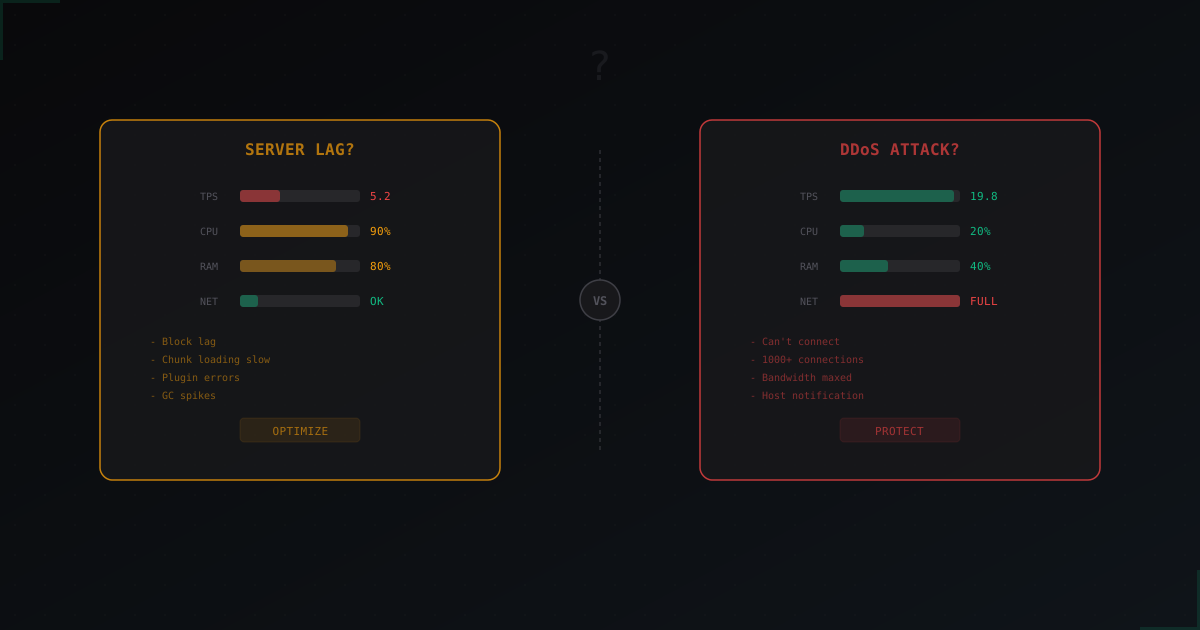
Minecraft Server Lagging: DDoS or Server Problems?
Not Every Lag Is a DDoS
Every time a server starts lagging, the first thought is "we're getting DDoSed". In about 80% of cases, that's wrong. Usually it's something mundane: a misconfigured plugin, not enough RAM, or a 15GB world loading chunks at the speed of a floppy disk.
The problem is that DDoS symptoms and server lag symptoms can look very similar. Players see the same thing - "server is lagging". But the causes are different, and the fixes are different too.
Let's go through concrete steps and figure out what's actually happening with your server.
Step 1: Check TPS
TPS (Ticks Per Second) is the server's heartbeat. Normal value is 20. Lower means the server can't keep up with game logic.
In Minecraft console:
/tps
Or if you have Spark:
/spark tps
What the numbers mean:
- 20.0 - everything's fine, the problem isn't game logic
- 15-19 - minor dips, tolerable
- 10-15 - noticeable lag, something's eating resources
- Below 10 - server is choking
Here's the key thing. If TPS is low (below 15), it's most likely a server problem, not an attack. DDoS attacks usually don't drop TPS because the attack happens at the network level. The server can have perfect 20 TPS while players still can't connect because the pipe is full.
TPS is 20 but there's lag? That's suspicious. Most likely a network issue - either DDoS or your host having network problems.
Step 2: Check CPU and RAM
SSH into the server and check load:
htop
Or if htop isn't installed:
top -c
What to look for:
- CPU 80-100% on the Java process - server is overloaded, TPS is probably low too. Server problem.
- RAM at 90%+ - when Java hits the memory limit, GC (garbage collection) kicks in and the server freezes for seconds. This is one of the most common causes of "lag".
- CPU fine, RAM fine, but still lagging - the problem isn't compute resources. Keep digging.
Step 3: Check the Network
This is where it gets interesting. Network problems come in two flavors: "we're being DDoSed" and "something broke at the host".
Connection count:
netstat -an | grep :25565 | wc -l
Normal numbers: if you have 50 players online, expect roughly 50-70 connections on the server port. Maybe 100 with reconnects.
Suspicious numbers: 500+ connections with 30 players online - something's off. 2000+ connections - almost certainly an attack.
Check traffic in real time:
iftop -i eth0
A normal Minecraft server with 50 players uses 5-15 Mbit/s. If you see 100+ Mbit/s with 20 players, that's not normal.
Step 4: Identify the Problem
Now you have data. Let's diagnose.
It's a server problem if:
- TPS is below 15
- CPU is at 80%+
- Logs show plugin errors or "Can't keep up!"
- Lag disappears when player count is low (at night, for example)
- Lag started after a plugin/world update
netstatshows normal connection count- Traffic is within normal range
It's DDoS if:
- TPS is normal (18-20) but players can't join
- Hundreds or thousands of connections in
netstat - Traffic at 100+ Mbit/s with few players
- Host sent a notification about abnormal traffic
- You can't SSH in (pipe is flooded)
- Logs show hundreds of "Player connected" and "Player disconnected" per second
- Problem appeared suddenly with no server changes
It's a host network issue if:
- TPS is normal
- CPU and RAM are fine
- Traffic is normal
- Connection count is normal
- But players have 200+ ping or packet loss
- The problem affects all players simultaneously
Server Problems That Look Like DDoS
Several typical situations where you think "we're being attacked" but the server is actually to blame.
Garbage Collection Spikes
When Java decides to clean up memory, the server can freeze for 1-5 seconds. For players this looks like a sudden freeze, then normal, then freeze again.
Add to your startup flags:
-XX:+UseG1GC -XX:+ParallelRefProcEnabled -XX:MaxGCPauseMillis=200
And make sure Xmx isn't over 10-12 GB. More RAM allocated means longer GC pauses.
Heavy Plugins
One poorly written plugin can tank the entire server. Classic examples - a plugin that runs SQL queries every tick or scans all entities.
Profile with Spark:
/spark profiler start
Wait 2-3 minutes, then:
/spark profiler stop
If any plugin takes 40%+ of tick time, that's your culprit.
Chunk Loading
When players scatter across the world, the server has to generate and load chunks. On HDD this is slow, on SSD it's tolerable but can still cause dips.
Solution - pregenerate the world:
/chunky radius 5000
/chunky start
MySQL Lag
If plugins use MySQL and the database is on the same server, heavy queries can lag everything. Check:
mysqladmin -u root -p processlist
If you see queries hanging for 10-30 seconds, the database is the problem.
Step-by-Step Diagnosis Flowchart
When the server starts lagging, follow this order:
1. Check TPS - /tps or /spark tps
- Low? Go to step 2A
- Normal (18+)? Go to step 2B
2A. Low TPS - server problem:
- Check CPU/RAM with
htop - Run
/spark profilerfor 2-3 minutes - Look at what's consuming resources
- Check logs for errors
2B. Normal TPS - network problem:
- Check connections:
netstat -an | grep :25565 | wc -l - Check traffic:
iftop -i eth0 - Lots of connections (500+)? Likely DDoS.
- Traffic through the roof? Likely DDoS.
- Everything normal? Host problem, contact support.
3. Confirm DDoS:
- Check top IPs:
netstat -an | grep :25565 | awk '{print $5}' | cut -d: -f1 | sort | uniq -c | sort -rn | head -20 - Check Minecraft logs for mass connections
- Check host notifications
What to Do Once You Know
If it's server lag:
- Update your server software. Paper, Purpur, Folia - every update includes performance fixes.
- Optimize configs.
view-distance: 6-8instead of 10,simulation-distance: 4-6. - Find the problem plugin. Spark profiling is your best friend.
- Pregenerate your world. Chunky solves chunk loading issues.
- Add RAM, but not more than 10-12 GB. More means longer GC pauses.
- Switch to SSD if you're still on HDD.
If it's DDoS:
This is more serious. iptables rules help against small attacks, but won't save you from a serious 10+ Gbit/s flood.
- Enable whitelist as a temporary measure.
- Don't change the port - it's useless. Attackers find new ports in under a minute.
- For real protection you need a reverse proxy that filters Minecraft traffic. Services like MineGuard analyze the Minecraft protocol and filter bots at the application level, not just by IP.
- Hide your real IP after setting up protection. If the attacker knows your real IP, they'll just bypass the proxy.
If it's a host issue:
- Contact support with specific data: "TPS 20, CPU 30%, but players have 300ms ping and 20% packet loss".
- Ask them to check network and routing.
- If the host doesn't fix it, switch hosts. Seriously.
Real Log Examples
Here's what a bot attack looks like in server logs:
[12:34:56] [Server thread/INFO]: Player392 (/185.23.xx.xx:54321) logged in
[12:34:56] [Server thread/INFO]: Player392 left the game
[12:34:56] [Server thread/INFO]: Player847 (/91.108.xx.xx:12345) logged in
[12:34:56] [Server thread/INFO]: Player847 left the game
Dozens of connections per second, different IPs, join-leave instantly. This is an L7 bot attack.
And here's what server lag looks like:
[12:34:56] [Server thread/WARN]: Can't keep up! Is the server overloaded? Running 4523ms or 70 ticks behind
"Can't keep up" is always a server problem, not DDoS. The server can't process ticks fast enough.
Bottom Line
Not every lag is a DDoS. Before panicking, spend 5 minutes on diagnosis. Check TPS, CPU, RAM, network. In most cases it'll be something mundane - a heavy plugin, not enough resources, or a corrupted world.
If it really is an attack, iptables hacks won't save you from anything serious. You need proper protection with protocol-level filtering, like we offer, or your own proxy if you have the expertise. And don't forget to hide your real IP, or everything else is pointless.
Protect Your Server from DDoS Attacks
Free protection with 5-minute setup. 1 TB bandwidth included.
Try for FreeRelated Articles

Slimefun: complete server guide for Minecraft in 2026
Slimefun4 on Paper 1.21: install, GuideBook, research, cargo network, energy, addons like ExoticGarden and InfinityExpansion, and how not to wreck TPS.
CoreProtect: Rollback Grief and Investigate Incidents on Your Minecraft Server
How to install CoreProtect, find the griefer via /co lookup, and undo the damage with /co rollback without restoring a world backup.
How to Install Plugins on a Minecraft Server: Complete Guide
Step-by-step guide to installing plugins on a Minecraft server: where to download, how to install, how to fix errors. Bukkit, Spigot, Paper - practical walkthrough.