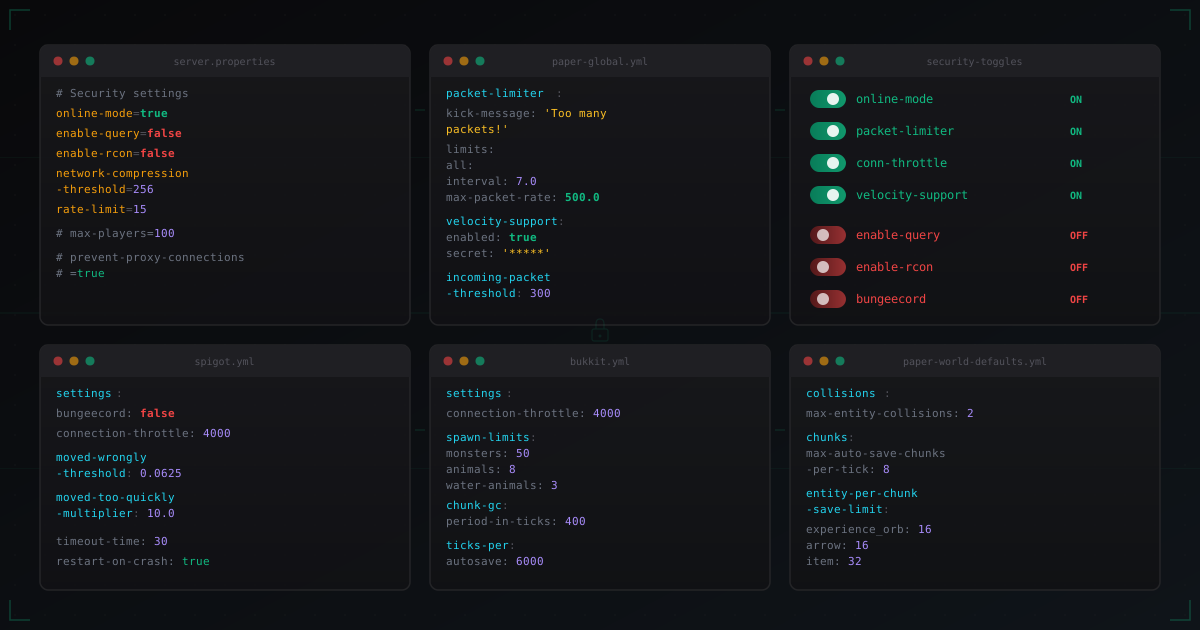
Paper and Spigot Security Settings: What to Enable and What to Disable
A Minecraft server has dozens of configuration files. And every one of them contains settings that directly affect security. The problem is that most admins leave default values in place. Defaults are designed for compatibility, not protection.
This article goes through each file individually. For every setting, I will explain not just "set this value" but why. Understanding the reasons matters more than copying someone else's configs.
server.properties: the foundation
This file is read first when the server starts. It controls basic vanilla Minecraft behavior, and this is where the most critical switches live.
online-mode
online-mode=true
This is the single most important security setting on your entire server. Period. When online-mode=true, the server verifies every connecting player through Mojang's authentication servers. This guarantees that the player actually owns the account they are logging in with.
When online-mode=false, anyone can join under any name. Want to log in as the admin? Go ahead. Want to take another player's name and steal their items? Easy. All it takes is changing the name in the launcher.
The only exception: if the server runs behind a proxy (Velocity, BungeeCord). In that case, online-mode=false on backend servers is acceptable because the proxy handles authentication. But then you absolutely need proper forwarding configured (more on that below).
If you run a standalone server without a proxy, online-mode must be true. No exceptions.
enable-query
enable-query=false
The query protocol lets external applications request information about your server: player list, version, description, installed plugins. Sounds harmless, but in practice it creates two attack vectors.
First: information leakage. An attacker gets your plugin list with versions. Knowing you run AuthMe 5.6.0, they can search for known vulnerabilities for that version. The online player list helps determine server activity and choose the best time for an attack.
Second: query runs over UDP. A UDP port accepting arbitrary requests is a ready-made amplification vector. Attackers can use your query port for reflected attacks against other servers, and you will be held responsible.
Turn query off. For monitoring, there are better options: plugins with APIs, RCON (with restrictions), external monitoring services.
enable-rcon
enable-rcon=false
rcon.port=25575
rcon.password=
RCON (Remote Console) gives full access to the server console over the network. It is like SSH, but for Minecraft. And the problem is exactly the same: if someone gets RCON access, they get full server control. They can execute any command, change settings, ban players, install plugins.
If you do not need RCON, turn it off. If you do need it (for automation, control panels), then:
- Use a strong password, at least 20 characters
- Restrict access with a firewall to localhost or the panel IP only
- Never expose the RCON port to the internet
# Allow RCON only from localhost
iptables -A INPUT -p tcp --dport 25575 -s 127.0.0.1 -j ACCEPT
iptables -A INPUT -p tcp --dport 25575 -j DROP
network-compression-threshold
network-compression-threshold=256
This parameter defines the minimum packet size (in bytes) before compression kicks in. The default value of 256 means packets larger than 256 bytes will be compressed before sending.
How does this relate to security? Compression reduces traffic but increases CPU load. An attacker sending many small packets can force the server to waste resources on unnecessary compression/decompression cycles.
256 is the optimal balance. Setting it too low (like 64) makes the server compress nearly every packet, wasting CPU. Setting it to -1 disables compression entirely, increasing traffic.
For servers behind a proxy, you can set -1 because the proxy handles compression. For standalone servers, keep it at 256.
rate-limit
rate-limit=15
Limits the number of packets per second from a single connection. The default value of 0 means no limit. That is bad. A single client with a modified launcher can send thousands of packets per second, overloading the server.
A value of 15 means the server will kick a connection sending more than 15 packets per tick (50ms). This is enough for normal gameplay but cuts off aggressive spam.
Do not confuse this with Paper's packet-limiter (covered below). rate-limit in server.properties works at a lower level, before packet processing by the server core.
prevent-proxy-connections
prevent-proxy-connections=false
This parameter makes the server check whether a player is connecting through a proxy or VPN, using the Mojang API. If the check shows that the player's IP differs from the IP used during authentication, the connection is rejected.
On paper it sounds useful. In practice it causes several issues. First, it adds latency to connections because the server sends a request to the Mojang API. Second, it can block legitimate players who use VPNs for security or due to ISP restrictions.
For standalone servers, you can enable prevent-proxy-connections=true as an additional protection layer. But if you already use a VPN blocking plugin (or a service like MineGuard that filters bots and proxies at the network level), there is little point to this setting.
Behind a proxy (Velocity/BungeeCord), keep this false, otherwise all connections will be rejected because the proxy IP will not match the authentication IP.
max-players
max-players=100
This seems like a capacity setting, not a security one. But think about it: if your server typically has 30 players, why keep the limit at 1000? During a bot attack, all 1000 slots will be filled with bots, and each one creates server load.
Set max-players slightly above your actual player count. If you typically have 30 players, set it to 50-70. This limits the scale of bot attacks and reduces load during connection flooding.
spigot.yml: the next layer
Spigot adds its own settings layer on top of vanilla. Many affect performance, but some are critical for security.
connection-throttle
settings:
  connection-throttle: 4000
Defines the minimum interval (in milliseconds) between connections from the same IP address. A value of 4000 means one IP can connect no more than once every 4 seconds.
Why it matters: during a bot attack, hundreds of connections come from each IP per second. Connection throttle blocks repeated attempts, reducing load on the authentication process.
Important caveat: if the server is behind a proxy (Velocity/BungeeCord), all connections arrive from one IP (the proxy IP). In this case, connection-throttle must be disabled (set to -1), otherwise it will block legitimate players.
# Behind a proxy:
settings:
  connection-throttle: -1
bungeecord
settings:
  bungeecord: false
This flag enables IP forwarding support from BungeeCord. When bungeecord: true, the server trusts player IP data that the proxy sends through a special field in the handshake packet.
The problem: if you enable bungeecord: true on a server that is not behind a proxy, anyone can spoof their IP. This is not a theoretical vulnerability. Ready-made tools exist for IP spoofing via BungeeCord forwarding. An attacker can join with the admin's IP and bypass IP bans, or impersonate another player.
Simple rule: bungeecord: true only if the server is actually behind BungeeCord AND the backend port is firewalled from external connections. In all other cases, false.
Even better: use Velocity with modern forwarding instead of BungeeCord. More on this in our Velocity vs BungeeCord article.
moved-wrongly-threshold and moved-too-quickly-multiplier
settings:
  moved-wrongly-threshold: 0.0625
  moved-too-quickly-multiplier: 10.0
These parameters control server-level movement anti-cheat checks. moved-wrongly-threshold defines the allowed deviation of a player's position from the expected one. moved-too-quickly-multiplier sets the maximum movement speed multiplier.
Default values are fairly lenient and work for most servers. Setting them too strict causes normal players with lag to get teleported back. Setting them too lenient lets cheaters fly and teleport without detection.
For serious cheat prevention, use a dedicated anti-cheat plugin (Grim, Vulcan) rather than relying on built-in checks.
timeout-time and restart-on-crash
settings:
  timeout-time: 30
  restart-on-crash: true
timeout-time determines how many seconds the server waits before considering a hung connection dead. The default 60 seconds is too much. 30 seconds is enough for normal gameplay, but dead connections will be closed faster, freeing resources.
restart-on-crash: true automatically restarts the server after a crash. Critically important for protection against crash exploits: if an attacker finds a way to bring the server down, it will at least come back up automatically.
paper-global.yml: Paper's power tools
Paper adds a massive number of security settings that Spigot lacks. This is one of the main reasons to use Paper over vanilla Spigot.
packet-limiter
packet-limiter:
  kick-message: '<red><lang:disconnect.exceeded_packet_rate>'
  limits:
    all:
      interval: 7.0
      max-packet-rate: 500.0
    ServerboundCommandSuggestionPacket:
      interval: 1.0
      max-packet-rate: 15.0
This is Paper's built-in anti-crash system. The packet-limiter tracks the number of packets of each type within a time interval and kicks the client if the limit is exceeded.
Default configuration: no more than 500 packets of any type per 7 seconds. For ServerboundCommandSuggestionPacket (tab completion), the limit is stricter: 15 packets per second. Why? Because tab completion triggers server-side processing, and spamming these packets can create significant load.
For additional protection, you can add limits on other "expensive" packets:
packet-limiter:
  kick-message: '<red><lang:disconnect.exceeded_packet_rate>'
  limits:
    all:
      interval: 7.0
      max-packet-rate: 500.0
    ServerboundCommandSuggestionPacket:
      interval: 1.0
      max-packet-rate: 15.0
    ServerboundContainerClickPacket:
      interval: 1.0
      max-packet-rate: 25.0
    ServerboundPlaceRecipePacket:
      interval: 1.0
      max-packet-rate: 5.0
Do not set limits too low. If max-packet-rate for all is 100, normal players will get kicked during active gameplay (opening chests, trading, PvP). 500 per 7 seconds is roughly 71 packets per second, which is enough for normal play.
velocity-support
proxies:
  velocity:
    enabled: true
    online-mode: true
    secret: 'complex-secret-key-from-velocity'
If you use Velocity as a proxy, this section replaces the outdated bungeecord: true in spigot.yml. Modern forwarding in Velocity uses HMAC to sign player data, making IP spoofing impossible (unlike BungeeCord).
The secret must match the forwarding-secret on the Velocity side. Use a long random key, not "password123".
Do not enable velocity-support and bungeecord at the same time. It makes no sense and can create conflicts.
Logging
logging:
  log-player-ip-addresses: false
By default, Paper logs player IP addresses. If you are in a GDPR jurisdiction (Europe) or simply want to minimize personal data storage, turn this off. IP addresses in logs are a data leak if the server gets compromised.
paper-world-defaults.yml: world protection
These settings apply to all worlds by default. Many of them prevent specific exploits.
max-entity-collisions
collisions:
  max-entity-collisions: 2
Limits the maximum number of entity collisions per tick. The default value of 8 allows creating entity "crushers" that generate massive collision calculations and tank TPS.
A value of 2 drastically reduces entity cramming load. This directly protects against a specific type of crash exploit: attackers shove hundreds of mobs into one block, and the server spends all resources calculating collisions.
max-auto-save-chunks-per-tick
chunks:
  max-auto-save-chunks-per-tick: 8
Determines how many chunks the server saves to disk per tick. Higher values mean faster saving but more lag during auto-save.
From a security perspective: if an attacker modifies many chunks (TNT explosions, lava casts), a high value means the server will try to save all damaged chunks simultaneously, creating an IO storm. A value of 8 ensures smooth saving without noticeable TPS drops.
entity-per-chunk-save-limit
entity-per-chunk-save-limit:
  experience_orb: 16
  snowball: 8
  arrow: 16
  item: 32
Limits the number of entities of a specific type saved per chunk. Without this limit, an attacker can create a chunk with thousands of entities that will lag forever on load.
These limits do not affect normal gameplay but protect against deliberate sabotage.
fix-entity-position-desync
fixes:
  fix-entity-position-desync: true
Fixes entity position desynchronization between server and client. Without this fix, some cheats can exploit desync to create invisible entities or move through walls. Keep this enabled.
anti-xray
anticheat:
  anti-xray:
    enabled: true
    engine-mode: 2
Anti-Xray is not a security setting in the classic sense, but it prevents resource exploitation through x-ray cheats. engine-mode: 2 replaces hidden ores with fake blocks, which creates some load but provides better protection. engine-mode: 1 simply hides ores, using fewer resources.
For servers with resource-based economies (SMP, survival), engine-mode: 2 is recommended. For minigames and PvP where ores do not matter, engine-mode: 1 or disabled is fine.
bukkit.yml: basic limits
connection-throttle
settings:
  connection-throttle: 4000
Works similarly to connection-throttle in spigot.yml. In practice, if both are set, spigot takes priority. But it is better to set the same value in both files for consistency.
Same recommendation: 4000 for standalone, -1 behind a proxy.
spawn-limits
spawn-limits:
  monsters: 50
  animals: 8
  water-animals: 3
  ambient: 1
Mob count limits per world. Vanilla defaults are too high. 70 monsters per player is excessive for most servers.
From a security angle: fewer mobs means less server load. If an attacker tries to cause lag through mob creation (spawners, eggs), low limits restrict their capabilities.
Proxy configuration (Velocity)
If your server sits behind Velocity, the configuration differs:
# server.properties
online-mode=false
network-compression-threshold=-1
rate-limit=0
# spigot.yml
settings:
  bungeecord: false
  connection-throttle: -1
# paper-global.yml
proxies:
  velocity:
    enabled: true
    online-mode: true
    secret: 'your-secret-key-from-velocity-forwarding-secret'
Note: online-mode=false in server.properties, but online-mode: true in velocity-support. Velocity handles authentication, and the backend trusts data from the proxy. And make sure to firewall the backend port. If port 25565 is open externally with online-mode=false, anyone can connect directly, bypassing the proxy and authentication.
What configs do not solve
Proper config settings close many attack vectors. But they do not replace other layers of protection.
Configs will not protect against network-level DDoS attacks. For that, you need external traffic filtering, for example through MineGuard. Paper's packet limits stop crash exploits, but against 10 Gbps of traffic they are powerless.
Configs do not replace a firewall. Even with perfect server.properties settings, open SSH, RCON, and database ports are security holes.
Configs do not replace updates. If a vulnerability is found in Paper, no settings will help. You need the patch.
The best approach is combining layers: proper configs + firewall + DDoS protection + regular updates. Each layer covers its own threats. For more on the comprehensive approach, read the Minecraft server security checklist.
Common mistakes
A few typical mistakes that even experienced admins make:
Enabled bungeecord without a proxy. Perhaps the most dangerous mistake. The admin tested BungeeCord at some point, enabled bungeecord: true, then removed the proxy but forgot to turn off the flag. Now anyone can spoof their IP when connecting.
RCON with a simple password, open to the internet. Often seen on servers with control panels. The panel runs on another server and connects to RCON over the network. But the port is open to everyone, and the password is "minecraft123". The result is predictable.
online-mode: false on standalone without reason. Some admins disable authentication "so cracked clients can join." This opens the door to account impersonation. If you need cracked client support, use AuthMe or a similar plugin, but ideally keep online-mode: true.
Overly aggressive packet limits. If you set max-packet-rate: 50 in the packet-limiter, players will get mass-kicked when opening a villager's trading menu or during active PvP. Test limits on a staging server before applying to production.
Summary
Minecraft server security starts with proper configs. Not with plugins, not with DDoS protection, but with five files that control the server's basic behavior.
Configure server.properties, spigot.yml, paper-global.yml, paper-world-defaults.yml, and bukkit.yml following the recommendations in this article. It will take 15 minutes and close dozens of attack vectors that are exploited daily.
After that: firewall, proxy, monitoring, and regular updates. Every layer adds protection, and none of them is optional.
Protect Your Server from DDoS Attacks
Free protection with 5-minute setup. 1 TB bandwidth included.
Try for FreeRelated Articles
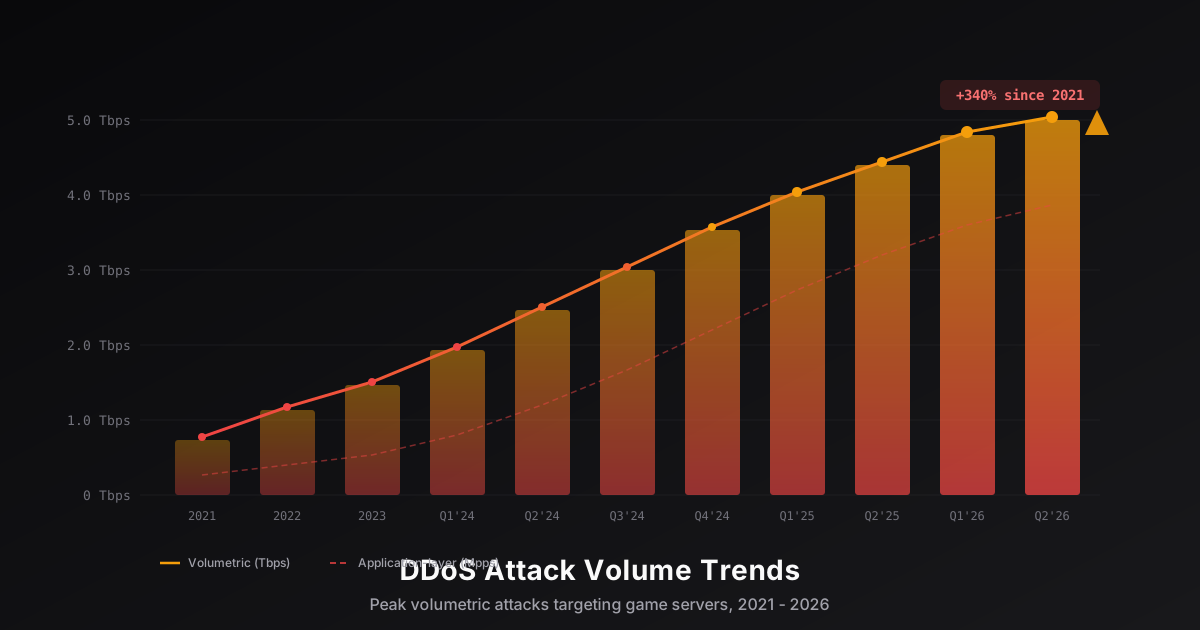
DDoS Attack Trends Targeting Game Servers in 2026
An analysis of key DDoS attack trends targeting the gaming industry in 2026: volume growth reaching terabit scale, evolution of Minecraft-specific attacks, IoT botnet proliferation, and new defense technologies built on XDP/eBPF and machine learning.

Java JVM Flags Optimization for Minecraft Servers: The Complete Guide
Master Aikar's flags, understand G1GC vs ZGC, configure memory correctly, and get copy-paste ready flag sets for any server size. A practical guide to JVM optimization for Minecraft.
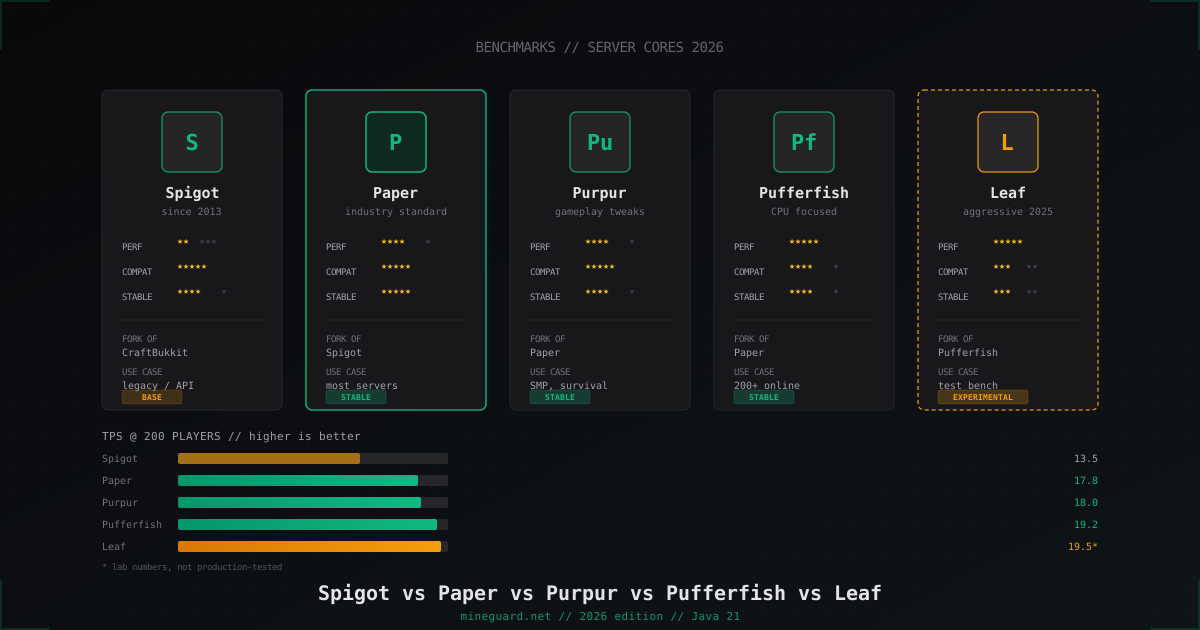
Minecraft Server Cores Compared 2026: Spigot vs Paper vs Purpur vs Pufferfish vs Leaf
Which Minecraft server core to pick in 2026: deep dive into Spigot, Paper, Purpur, Pufferfish and Leaf with real TPS numbers and player-count guidance.