DNS Setup
CNAME, SRV and TXT records for connecting protection
Correct DNS configuration is the key step. If DNS is set up incorrectly, players won't be able to connect through the protection.
CNAME record
After adding a domain in the MineGuard panel you'll receive a unique protected address like xxxxx.ipv4.mineguard.pro. Copy it and use it as the value of your CNAME record.
Type:  CNAME
Name:  play
Value: <your address from the panel>.ipv4.mineguard.pro
TTL: 300Type: CNAME (or ALIAS / ANAME, depending on your provider)
Name: @
Value: <your address from the panel>.ipv4.mineguard.pro
TTL: 300play.myserver.com) or switch to Cloudflare DNS (free).Player enters
play.server.com
DNS
CNAME →
mineguard.pro
MineGuard
Filtering
Your Server
IP hidden
SRV record
An SRV record lets Minecraft clients connect without specifying a port. Without it, players need to type play.myserver.com:25565; with it they can just use play.myserver.com.
Type:     SRV
Service:  _minecraft
Protocol: _tcp
Name:     play.myserver.com
Priority: 0
Weight:   5
Port:     25565
Target:   play.myserver.com
TTL:      300
TXT record for verification
The TXT record is required to confirm domain ownership. The value comes from the control panel.
Type:  TXT
Name:  _mineguard.play  (or _mineguard for the root domain)
Value: mineguard-verify=your_token
TTL:   300
Examples for popular providers
Cloudflare
In the Cloudflare panel: DNS → Add Record. Important: disable the orange cloud (Proxy) for the CNAME record — if you leave it enabled, Cloudflare will proxy traffic on top of MineGuard and nothing will work.
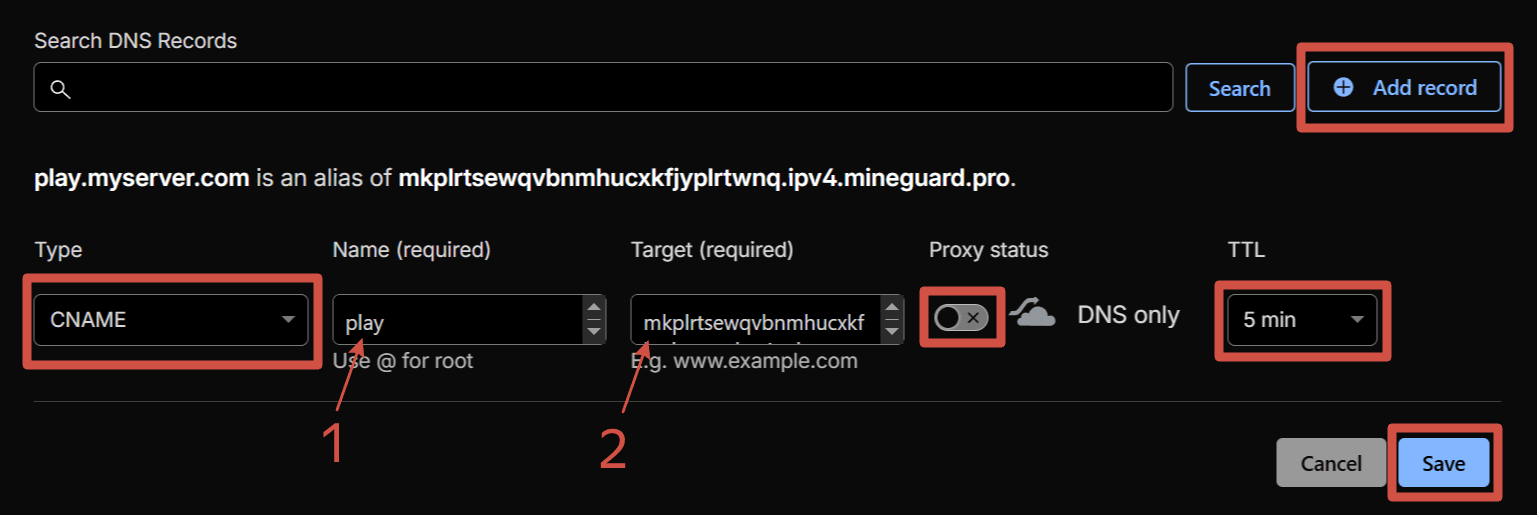
Namecheap
Advanced DNS → Add New Record → CNAME. In the Host field enter your subdomain (e.g. play), and in the Value field enter your protected address from the MineGuard panel.
REG.RU
Domains → your domain → DNS servers and zone management → Add record → CNAME.
Checking DNS
After changing DNS, confirm that the records have updated. You can check from the terminal:
nslookup play.myserver.com
# Should show CNAME → your_address.ipv4.mineguard.pro

nslookup -type=TXT _mineguard.myserver.com
# Should show your verification TXT record